
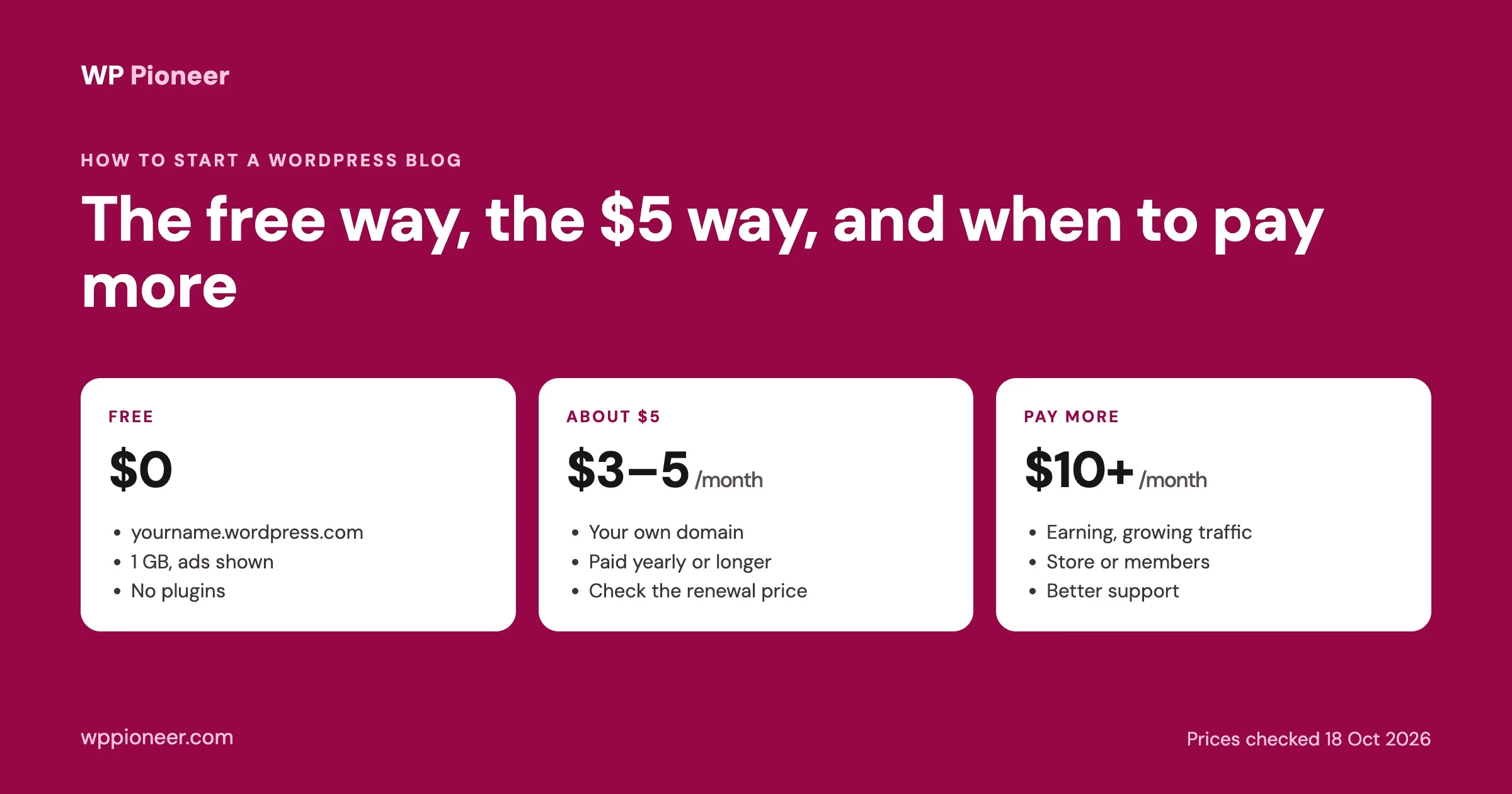
You can start a WordPress blog today for nothing, for about the price of a coffee a month, or for more if you want room to grow. The right choice depends on what you want the blog to do, not on what an advert tells you. This guide explains the three routes honestly, with prices we checked on the providers’ own pages on 18 October 2026, then walks you through setting up whichever one you choose, from picking a name to publishing your first post.
This guide is for anyone starting their first blog: hobby writers, small business owners who want a blog next to their site, freelancers building a portfolio of writing, and anyone who has been put off by hosting adverts that do not say what things really cost. No technical knowledge is assumed. Where a step differs between WordPress.com and your own hosting, we say so.
The short answer
Route | What it costs | Good for | The catch |
|---|---|---|---|
The free way: WordPress.com Free | $0 | Trying blogging, a personal journal, a class project | An address like |
The $5 way: a cheap paid plan | About $3 to $5 a month, paid yearly or longer | Most new bloggers who want their own domain | The low price needs a long upfront term, and renewal prices are higher |
Paying more | From roughly $10 to $25 a month and up | Blogs that earn money, get steady traffic, or need a store or members | Only worth it once the blog needs it |
If you are unsure, start with the free way to find out whether you enjoy writing regularly, then move to your own domain once you have a dozen posts. WordPress.com lets you export your content (Tools, Export), so nothing is lost when you move.
WordPress.com or WordPress.org: what is the difference?
You will see two WordPresses, and the difference matters for cost:
- WordPress.org is the free software. You install it on hosting you pay for (or your host installs it for you), and you control everything: themes, plugins, ads, your data.
- WordPress.com is a service run by Automattic that hosts WordPress for you. It has a free plan and paid plans, and it handles updates, security and backups, with some limits on what you can change.
Both run the same WordPress at heart, and you write posts the same way in both. The questions are who looks after the site and what you are allowed to install. Our comparison of hosting, WordPress.com and self-hosted WordPress goes deeper if you want the full picture.
The free way: WordPress.com Free
On 18 October 2026, the WordPress.com pricing page listed the Free plan at $0 with “No expiration date”. It includes:
- A free address on a WordPress.com subdomain, such as
yourname.wordpress.com - 1 GB of storage for images and files
- Unlimited pages, posts and users
- Basic statistics for the last 7 days
And it leaves out:
- A custom domain of your own
- Plugins: the page says plugin installation is available on every paid plan, not on Free
- An ad-free site: “Free sites display WordPress.com ads to visitors”
Is the free way good enough?
For writing practice, a hobby blog or sharing with friends, yes. It is not a good fit if you want to earn money from the blog, look professional with your own domain, or add features through plugins. 1 GB also fills up within months if you post lots of large photos.
Setting it up
- Go to WordPress.com and create an account.
- Choose the free subdomain when it offers you domain options, and the Free plan when it offers plans.
- Pick a theme, then go straight to writing (Step 5 below).
The $5 way: your own domain on a budget
This is the route most new bloggers end up on. There are two common ways to do it.
Option A: WordPress.com Personal
On the same pricing page, the Personal plan was $4 a month when paid yearly ($9 if you pay monthly), with lower monthly rates for two- and three-year terms. It removes the ads, raises storage to 6 GB and, per the page, allows plugins. Annual and longer plans include a free domain for the first year; monthly plans do not.
Option B: budget shared hosting with WordPress.org
Many hosts sell WordPress hosting at a few dollars a month. As an example of how these prices work, Hostinger’s WordPress hosting page on 18 October 2026 listed its Premium plan at $2.99 a month. Read the small print before you buy, because it is typical of the whole market:
What the advert shows | What the page says underneath |
|---|---|
$2.99 a month | For a 48-month term, paid upfront |
Low monthly price | Renews at $10.99 a month |
Free domain | Free for the first year only |
Up to 3 websites | On that plan |
None of this is a trick unique to one company; budget hosting is sold this way almost everywhere. The honest monthly cost is the renewal price, and the honest first bill is the whole term paid upfront. Budget for the domain renewal in year two as well.
Which option should you pick?
If you want | Pick |
|---|---|
The least maintenance: updates, security and backups handled for you | WordPress.com Personal |
Full control, any plugin or theme, several small sites on one plan | Budget hosting with WordPress.org |
To pay monthly with no long commitment | WordPress.com monthly (no free domain), or a host with monthly billing at a higher price |
What it really costs in year one and year two
Monthly prices hide the real bill. Here is the arithmetic for the two budget options, using the prices listed on 18 October 2026. Domain prices vary by name and ending, so check the renewal price for the exact domain you choose.
WordPress.com Personal, yearly | Budget host (Hostinger Premium example) | |
|---|---|---|
First bill | $48 for 12 months ($4 x 12) | About $143.52 for 48 months ($2.99 x 48) |
Domain, year one | Included on yearly plans | Included for the first year |
Domain, year two | Paid separately at the registrar’s renewal price | Paid separately at the renewal price |
What happens at renewal | Renews at the plan’s price at the time | Listed renewal price $10.99 a month |
Maintenance by you | Very little: WordPress.com handles updates and security | You update WordPress, themes and plugins and check backups |
Two takeaways. First, the cheapest-looking host asks for four years of payment upfront, which is a lot to commit to a blog you have not started. Shorter terms usually cost more per month but less in total if you stop. Second, the time you spend on maintenance is a cost too. If you would rather write than manage software, the managed route can be the better deal even when the monthly number is higher.
When is it worth paying more?
Pay for more when the blog has a real need, not in advance. The signs:
- The blog earns money through ads, affiliate links or products, and downtime now costs you.
- Traffic is steady and growing, and pages are getting slow at busy times.
- You need features budget plans limit: a shop, a membership area, lots of storage for media, or staging copies to test changes.
- You want help: faster support, daily backups you can restore yourself, a malware scanner.
At that point, look at better shared plans, managed WordPress hosting, or WordPress.com’s higher plans (the pricing page listed Premium at $8 and Business at $25 a month on yearly billing). Our guide to choosing hosting for your budget and traffic matches hosting types to traffic levels.
Before you start: a topic and a name
Ten minutes of thinking here saves you a rename later.
- Topic: choose something you could write twenty posts about without running out of ideas. Narrow beats broad: “budget vegetarian cooking for students” is easier to grow than “food”.
- Name: short, easy to spell when said out loud, and not tied to a single year or a trend you may move on from.
- Domain: check the name is free as a domain before you fall in love with it. A .com is easiest for people to remember; a local or topic ending is fine if the .com is taken. Check the same name on the social networks you plan to use, so readers find you under one name everywhere.
Step 1: get your hosting and domain
On WordPress.com, choose your plan and claim your domain during sign-up. On a host, buy the plan and register the domain in the same order; it saves you connecting them yourself. Turn on any free SSL certificate the host offers, so your address starts with https.
Step 2: install WordPress
WordPress.com is ready the moment you sign up. Most hosts offer a one-click WordPress installer in their control panel, and many install it for you when you buy a WordPress plan. You will choose a site title, an admin username and a strong password; keep the password in a password manager. If you want to see each screen first, our guide on how to install WordPress walks through it.
Step 3: choose a theme
A theme controls how your blog looks. A new WordPress site comes with a default theme already active; on our fresh WordPress 7.1.3 test install it was Twenty Twenty-Five, which is clean, fast and fine for a blog. Change the colours, fonts and logo under Appearance, Editor before you consider buying a theme. Spend money on a theme only when you need a specific layout the free ones cannot give you.
Step 4: add a few essential plugins (self-hosted and paid WordPress.com plans)
Plugins add features. Start with the few that protect the blog, and add others only when you need them:
Need | Why |
|---|---|
Backups | So a mistake or a broken update is a ten-minute fix, not a lost blog. Many hosts include them; check yours does |
Spam protection for comments | If you allow comments, spam arrives within days |
SEO help | Helps you write titles and descriptions for search results; see our comparison of SEO plugins |
A contact form | So readers can reach you without you publishing your email address |
Every plugin is code that runs on your site, so fewer is better. Delete any you stop using.
Step 5: write and publish your first post
Go to Posts, Add New. Write a clear title, a short opening that says what the reader will get, a few sections with headings, and an image if it helps. Then publish. Your first post will not be perfect, and it does not need to be. Our guide to writing your first WordPress blog post covers headings, images and getting it found.
Good first posts
- An answer to a question people in your topic ask often
- A beginner’s guide to something you know well
- Your honest experience with a tool, recipe, trip or method
Step 6: the settings that matter on day one
- Settings, General: your site title and tagline, timezone and admin email address (make sure it is one you read).
- Settings, Permalinks: choose “Post name” so addresses read like
/how-to-start-a-blog/before you publish many posts. Changing this later breaks links. - Settings, Reading: make sure “Discourage search engines from indexing this site” is unticked when you are ready to be found.
- Settings, Discussion: decide whether to allow comments and whether to approve them first.
- Your profile: add your name and a short bio; readers trust a person more than an anonymous blog.
Our list of essential WordPress settings to configure first explains each one.
Keep your new blog safe from day one
New blogs are attacked by automated bots within days of going live; they do not care how small you are. Five habits cover most of the risk:
- A strong, unique password for your admin account, stored in a password manager, and two-factor login if your host or WordPress.com offers it.
- Updates applied promptly, especially security releases. On WordPress.com this is done for you; on your own hosting, check Dashboard, Updates weekly.
- Backups you have tested, kept somewhere other than the blog’s own server.
- Only plugins and themes from trusted sources: the official WordPress directory or well-known developers. Never “free” copies of paid plugins.
- An admin email you actually read, so security notices and password resets reach you.
Moving from the free plan to your own domain later
If you start on WordPress.com Free and outgrow it, the move is straightforward when done early:
- Decide where you are going: a paid WordPress.com plan (the simplest: your posts stay where they are and you add a domain), or your own hosting with WordPress.org.
- For a paid WordPress.com plan, upgrade from your site’s plan settings and add the domain. Nothing needs exporting.
- For your own hosting, install WordPress on the new host, then on WordPress.com go to Tools, Export and download your content. On the new site, go to Tools, Import, choose WordPress, and upload the file. Posts, pages, comments, categories and tags come across; check images after the import.
- Point your domain at the new site and test every page you care about.
- Tell your readers the new address, and keep publishing.
The fewer posts and shared links you have when you move, the less there is to check, which is one more reason to decide within your first few months.
Common beginner mistakes
- Paying for three years before writing a single post. Prove to yourself you enjoy blogging first.
- Judging hosting by the intro price. Compare renewal prices.
- Installing twenty plugins on day one. Each one is something to update and something that can break.
- Spending a week on design. Readers come for the writing; a clean default theme is enough.
- No backups. Set them up before you have anything to lose.
- Changing the permalink setting after publishing, which breaks every link already shared.
Can you make money from a blog?
Yes, but slowly. The usual routes are display ads, affiliate links to products you recommend, and selling your own products or services. None of them work without readers, and readers come from consistently useful posts over months. If earning money is the goal, choose your own domain from the start (the $5 way), because ads and affiliate programmes are limited or unavailable on a free WordPress.com site that shows WordPress.com’s own ads.
What to do after your first post
- Write a short list of the next ten posts so you never face a blank page.
- Pick a publishing rhythm you can keep, such as one post a week.
- Share each post where your readers already are.
- After a month, look at what people read most and write more like it.
Your first month, week by week
Week | Do this | Done when |
|---|---|---|
1 | Choose the route, set up the site, change the day-one settings, publish your first post | Your first post is live at your address |
2 | Write two more posts from your list; add an About page with your name and why you write | Three posts and an About page |
3 | Set up backups (or confirm your host does them), add a contact form, share your posts where your readers are | A backup you have seen, and your first readers |
4 | Look at which post people read most and write a follow-up to it; plan the next month’s posts | Five posts and a list of ten more |
Keep it light. The aim of the first month is a habit, not a perfect site.
Frequently asked questions
Can I start a WordPress blog for free?
Yes. WordPress.com’s Free plan costs $0 with no expiry date. You get a WordPress.com subdomain and 1 GB of storage, visitors see WordPress.com ads, and you cannot install plugins. It is a good way to find out whether you enjoy blogging.
How much does a WordPress blog cost per month?
$0 on WordPress.com Free; about $3 to $5 a month for the cheapest paid routes when paid yearly or longer (WordPress.com Personal was $4 a month on yearly billing on 18 October 2026); more once you need speed, storage or support. Check renewal prices, not only the first-term price.
Is WordPress.com the same as WordPress?
Both use the WordPress software. WordPress.com is a hosted service with free and paid plans; WordPress.org is the software you install on hosting you choose, with full control.
Can I move from WordPress.com Free to my own hosting later?
Yes. Export your content from WordPress.com (Tools, Export) and import it into the new site. Moving early, before you have many posts and links, is easiest.
Is the cheapest hosting good enough for a new blog?
Usually, yes. A new blog has few visitors, and budget shared hosting handles that comfortably. Upgrade when pages slow down at busy times or when the blog starts to earn money. Compare renewal prices and the length of the term before you buy.
Can I remove the WordPress.com ads on the free plan?
Not on the Free plan. The pricing page states that free sites display WordPress.com ads to visitors; the paid plans, starting with Personal, remove them.
Do I need to know how to code?
No. Everything in this guide is done through menus and settings. Code becomes useful only for custom features later, if ever.
How long does it take to start a blog?
An afternoon to set up, and the first post the same day if you have your topic ready.
The bottom line
Start where your commitment is today: free if you are testing the idea, the $5 way if you want your own name on it, and more only when the blog has earned it. The setup takes an afternoon. The thing that makes a blog work is the next twenty posts, so spend your energy there. Whatever you choose, write down what you pay, when it renews and at what price, and set a reminder a month before; it is the simplest way to avoid surprise bills and to switch on your own terms.
No comments yet