
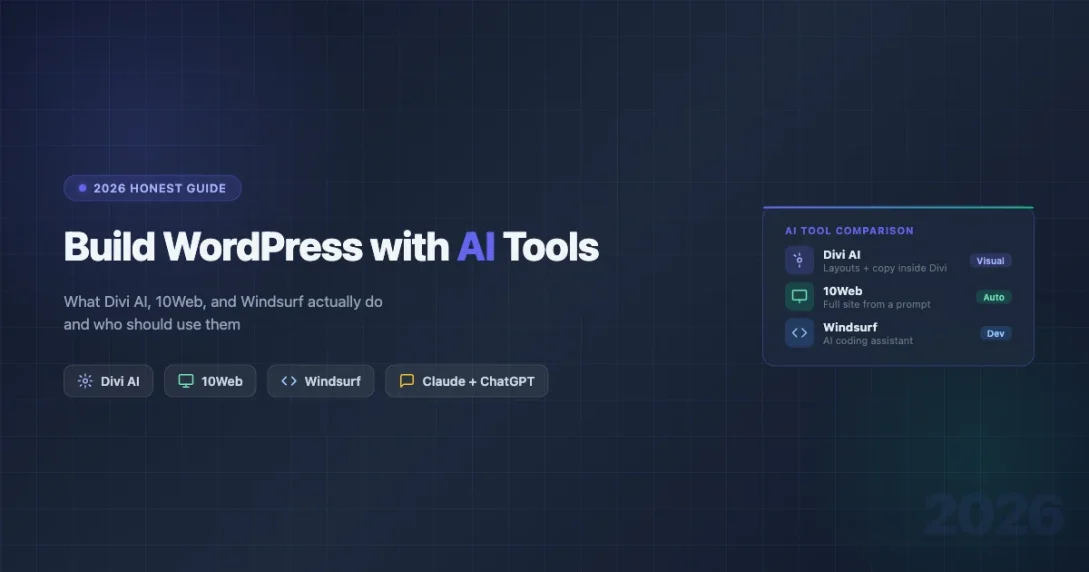
Everyone says AI will build your website for you. You have seen the ads: type a prompt, get a finished site in minutes, no coding needed. By 2026, a handful of tools are legitimately good at parts of that promise. But parts is the key word.
This guide is for people who want an honest answer, not a product pitch. We will cover what Divi AI, 10Web, and Codeium actually do, what they cost, where they fall short, and who should use each one. We will also look at where free AI tools like Claude and ChatGPT fit into a real WordPress workflow, and what AI still cannot do for you at all.
The State of AI Website Building in 2026
AI in WordPress has split into two very different categories. The first category is no-code site generation: tools that take your description and output a complete-looking website. The second is developer assistance: AI that helps people who already know how to build websites do it faster.
These two categories get conflated constantly, which creates bad expectations. A freelancer using Codeium is getting something entirely different from a small business owner using 10Web. Both involve AI. Neither replaces the other.
Here is what 2026 AI site builders can genuinely do well:
- Generate a visually presentable starter layout from a text prompt
- Write placeholder copy that is better than “Lorem ipsum”
- Suggest page structures based on industry type
- Speed up coding tasks for developers who know what they want
Here is what they still cannot do reliably:
- Build a site that ranks on Google without significant additional SEO work
- Create custom functionality (membership systems, booking engines, complex WooCommerce setups)
- Produce clean, lightweight code that will not slow your site down
- Make meaningful business decisions about your content strategy
Keep those two lists in mind as we go through each tool.
Divi AI: AI Built Into a Page Builder You Already Know
What Divi AI Is
Divi is one of the oldest and most widely used WordPress page builders. Elegant Themes, the company behind it, launched Divi AI as a layer on top of the standard Divi builder. It uses OpenAI’s models under the hood to generate text, images, and layout suggestions directly inside the Divi editor.
Divi AI is not a separate product. It is an add-on to a Divi subscription. If you are already on Divi, activating the AI features is a checkbox in your account dashboard.
Pricing
A standard Divi subscription runs around $89 per year (annual plan) or $249 for a lifetime license. Divi AI is an additional cost on top of that, currently around $16 per month or $144 per year when billed annually. Verify current pricing at elegantthemes.com before purchasing, as Elegant Themes adjusts pricing periodically.
That price is per site or per account depending on which tier you choose, so factor that in if you manage multiple sites.
What Divi AI Actually Generates
When you open a Divi section or module, you will see an AI button. Click it and you can:
- Generate text: Write a headline, paragraph, or button label. You can prompt it with context about your business and it returns usable copy. Quality is similar to asking ChatGPT directly, but it is embedded in your layout workflow so you do not have to paste content back and forth.
- Generate images: Divi AI uses image generation to create background images and hero images from a text prompt. The results are inconsistent. Some generations look professional. Others look like stock-photo AI artifacts from 2022. You will delete more than you keep.
- Generate layouts: You can describe a section and have AI suggest a full Divi layout for it, complete with modules populated with generated content.
Honest Assessment of Quality
The text generation is genuinely useful for getting unstuck. If you are staring at a blank hero section and need a headline, Divi AI will give you five options in seconds. Most of them will need editing, but they are workable starting points.
The image generation is the weak link. AI-generated images still carry visual tells that careful users will notice: hands with wrong finger counts, text that is not quite legible, backgrounds that look slightly off. For a professional services site, you are better off using a real photo or a properly designed graphic.
The layout generation works best for common page types: a services page, a pricing table, a simple about section. It struggles with anything non-standard. If your business model is unusual, the AI does not understand it well enough to produce a useful layout.
Who Should Use Divi AI
Divi AI makes sense if you are already using Divi and you spend a lot of time on copywriting or iterating on layouts. It is a workflow accelerator, not a site generator. You still need to know how Divi works, make design decisions, and review everything the AI produces.
It does not make sense as a reason to switch to Divi if you are already happy with another builder. The AI features are not so differentiated that they justify changing your entire workflow.
10Web AI Website Builder: The Closest Thing to “Type and Get a Site”
What 10Web Is
10Web is a WordPress hosting platform that has put AI website generation at the center of its product. The pitch is direct: describe your business, answer a few questions, and 10Web generates a complete WordPress site with Elementor layouts, copy, and images. Hosting is included.
The generation process takes a few minutes. You get a site that is ready to open in a browser, edit, and potentially publish. For a non-technical user who just needs an online presence, this is the most complete AI-to-site pipeline available for WordPress right now.
Pricing
10Web’s plans start around $10 per month when billed annually for a single site. Higher tiers support multiple sites and add performance features. The base plan includes the AI builder, hosting, automated backups, and their performance optimization layer. Check 10web.io for current pricing, as they run frequent promotions.
How the AI Generation Works
The setup flow asks for your business name, industry, a description of what you do, and which pages you need. The AI then generates:
- A homepage with hero section, features/services blocks, social proof area, and call to action
- Supporting pages like About, Services, and Contact
- Copy written for your specific business type based on your description
- Images sourced from a combination of stock photo libraries and AI generation
The output is built on Elementor, so you can edit any element using the standard Elementor interface after generation. You are not locked into a proprietary editor.
How the Output Compares to a Hand-Built Site
The generated sites look professional at first glance. The layouts follow standard conversion-focused patterns: large hero, three-column feature grid, testimonial carousel, footer with contact info. For a local service business (a plumber, a personal trainer, a photographer), the output is often close to publication-ready with light editing.
The gap appears when you look closer. The generated copy uses generic phrasing that reads like a first draft. Sentences like “We are dedicated to providing exceptional service” appear frequently. You will need to rewrite most of the copy to sound like an actual human business.
The code underneath is Elementor markup, which is inherently heavier than a hand-coded site. A 10Web-generated site will typically have more HTTP requests and a larger DOM than a developer-built site. This matters for performance and Core Web Vitals scores. 10Web includes a caching and optimization layer that helps, but it does not close the gap entirely.
SEO is where the gap is widest. The generated pages have no keyword strategy, no internal linking structure, and generic meta descriptions. If you want the site to rank for anything beyond your business name, you will need to approach SEO from scratch after generation.
When 10Web Is Worth It
10Web makes sense for non-technical users who need a real website, not a landing page, and want to avoid hiring a developer for a basic presence. If you are already on a platform like Squarespace and thinking about switching, a guide on how to move from Squarespace to WordPress is worth reading before committing to any AI-generated setup. The output is better than most DIY page builder efforts by people with no design sense. The hosting is included and the setup time is under an hour.
It is the wrong tool for WooCommerce stores, membership sites, portfolio sites that need strong visual differentiation, or any site where content quality and SEO are central to the business model. Those use cases require deliberate human decisions that AI generation cannot make for you.
Codeium (Now Windsurf): AI for WordPress Developers
This Is a Different Category Entirely
Codeium rebranded to Windsurf in late 2024 and expanded significantly beyond its original autocomplete focus. It is an AI coding assistant, not a website builder. The distinction matters because if you are a non-developer looking for a site generator, this tool is not for you.
Windsurf is for WordPress developers and technically capable users who write PHP, JavaScript, and CSS. The AI helps you write that code faster, understand existing code you did not write, and catch errors before they reach production.
What Windsurf Does for WordPress Work
The core capability is autocomplete with context awareness. When you are writing a WordPress plugin and you type a function name, Windsurf understands WordPress conventions well enough to suggest the correct hook, the right parameter order, and typical usage patterns. This is significantly more useful than generic autocomplete.
The Cascade feature (their agentic mode) lets you describe a task in plain language and have Windsurf make multiple edits across files. For example: “Add nonce verification to this form submission handler.” Windsurf finds the relevant code, adds the nonce generation to the form, and adds the verification to the processing function. A five-minute task for an experienced developer becomes a thirty-second task.
For explaining existing code, it is particularly good. If you have inherited a WordPress theme with undocumented custom functions, you can highlight a block of PHP and ask Windsurf to explain what it does. The explanations are accurate and helpful for onboarding onto a codebase.
Pricing
Windsurf has a free tier with limited AI requests per day. The Pro plan runs around $15 per month and removes usage caps. Check windsurf.com for current tiers, as pricing has changed since the rebrand and may change again.
Limitations for WordPress Specifically
AI coding assistants are good at standard WordPress patterns but struggle with highly customized setups. If you are working with a plugin that has unusual architecture, the suggestions may not fit. Always review AI-generated code before committing it.
Security is an important caveat. AI-generated PHP code sometimes skips sanitization, escaping, or capability checks. These are exactly the kinds of vulnerabilities that get WordPress sites compromised. Never ship AI-generated code without reviewing it against WordPress security best practices.
WordPress Playground and AI: Experimental but Promising
WordPress Playground is a browser-based WordPress environment that runs entirely in WebAssembly. No server required. The WordPress project has been experimenting with AI integration in Playground, including the ability to generate and install plugins from a prompt directly in the browser.
As of early 2026, the AI features in Playground are experimental and not production-ready. You can use Playground to test AI-generated code snippets in a sandboxed environment before putting them on a real site. This is genuinely useful as a development workflow step.
For content creation and site building, Playground AI is not at the level of the paid tools above. Watch the WordPress.org blog for updates, as this is an active development area.
Claude and ChatGPT for WordPress: Practical Workflows That Actually Work
General-purpose AI assistants like Claude (from Anthropic) and ChatGPT (from OpenAI) are not site builders. They do not connect to your WordPress install or generate layouts. But they are genuinely useful in a WordPress workflow in ways that the dedicated tools above are not.
Writing Page Content
Give Claude or ChatGPT your business description, target customer, and the goal of a specific page, and ask it to write the page copy. The output needs editing, but a good prompt produces a solid first draft faster than writing from scratch. This works for service pages, about pages, and product descriptions.
The important caveat: AI-written copy tends toward generic phrasing. If you want copy that sounds like your brand, you need to provide examples of your existing writing and be specific about tone. Without that guidance, you get corporate-speak.
Generating PHP Snippets
This is one of the most practical uses. If you need a small customization like removing a field from the WooCommerce checkout, adding a custom column to the posts list, or changing how a plugin outputs its shortcode, AI can write that function for you. Describe what you want in plain English and ask for the WordPress PHP code.
These small, self-contained snippets are where AI code generation is most reliable. The simpler and more specific your request, the better the output. Avoid asking AI to architect entire plugins from scratch without reviewing every file carefully.
Debugging Errors
Copy a PHP fatal error or JavaScript console error, paste it into Claude or ChatGPT, and ask what is causing it and how to fix it. The AI recognizes common WordPress errors and will often point directly to the relevant hook, function, or plugin conflict. This saves significant time compared to searching through forums.
For errors in plugins you did not write, providing the relevant code context along with the error message produces better results. The more context you give, the more specific the answer.
AI Image Generation for WordPress
Getting good images for WordPress content is a legitimate use case for AI. The main options in 2026 are:
DALL-E via Plugins
Several WordPress plugins integrate DALL-E directly into the media library, letting you generate images without leaving WordPress admin. The convenience is real. The image quality from DALL-E 3 is good enough for blog post illustrations and simple graphics.
The weakness is photorealism and consistency. If you need a consistent visual style across your site or images that look like real photographs, DALL-E struggles. For illustration-style graphics and abstract concepts, it works well.
Midjourney for Hero Images
Midjourney (accessed through Discord) produces visually striking images that are good enough for homepage heroes and blog featured images when used for the right subjects. The learning curve for effective prompting is real, but the output quality ceiling is higher than DALL-E for artistic and atmospheric images.
The workflow is not integrated with WordPress. You generate in Discord, download, and upload to your media library manually. For occasional use, this is fine. For a high-volume content operation, the friction adds up.
The “AI-Built Site” Trap
There is a pattern that emerges with AI site generation that is worth naming directly: sites that look fine on the surface but have structural problems underneath.
A 10Web-generated site or an AI-assisted Divi build will look presentable in a browser. But look at the page source and you often find bloated markup, redundant CSS, and no semantic heading structure. Look at the content and you find no keyword targeting, no internal links, and generic meta descriptions. Look at the performance scores and you find a page weight that is higher than it should be.
AI-generated sites often look fine for months. The problems show up in analytics: no organic traffic, high bounce rates, and slow Core Web Vitals. By then, the client has moved on.
None of these problems are immediately visible to the site owner. They become visible over months, when the site does not rank for anything and page load times frustrate mobile users.
This is not an argument against using AI site generation tools. It is an argument for knowing what you are getting. If you use 10Web to launch a basic presence for a local business, that is a legitimate and efficient choice. If you expect the generated site to rank and grow into a content-driven business, you will be disappointed without significant additional work.
What AI Still Cannot Do in WordPress
Custom Plugin Logic
AI can write simple WordPress functions. It cannot design and build a custom plugin that handles complex state, integrates with multiple third-party APIs, and needs to be maintained over years. That still requires a developer who understands the full scope of the problem.
Real SEO Strategy
AI can suggest keywords and write meta descriptions. It cannot tell you which keywords your specific business can realistically rank for, what content gaps exist in your market, how to build a topical authority structure, or how to get links. SEO strategy requires research and judgment that no AI site builder includes.
Performance Optimization
Caching, image optimization, server configuration, database cleanup, and Core Web Vitals work require understanding your specific setup. AI can tell you general best practices. It cannot run the diagnostics, identify the specific bottleneck on your server, and implement the fix. Tools like Query Monitor and WP Rocket need human hands on the configuration.
Design That Reflects a Real Brand
AI generates layouts based on common patterns. It does not understand your brand’s positioning, your competition, or what visual language will connect with your specific audience. A site that looks like every other site in your category is not a competitive advantage. Real brand differentiation still comes from human creative decisions.
Quick Comparison: Which AI Tool Fits Your Situation
| Tool | Best For | Price Range | Technical Level Needed |
|---|---|---|---|
| Divi AI | Divi users who want layout + copy help | ~$89/yr + ~$144/yr for AI | Beginner to intermediate |
| 10Web | Non-technical users needing a fast starter site | ~$10/mo (annual) | Beginner |
| Windsurf (Codeium) | Developers writing WordPress PHP/JS/CSS | Free tier / ~$15/mo Pro | Developer |
| Claude / ChatGPT | Copy drafts, PHP snippets, debugging | Free / subscription | Any level |
Honest Verdict: Who Should Use AI Site Builders
Good Fit
AI site builders like 10Web make sense for:
- Local service businesses that need an online presence with basic information, contact forms, and a Google Maps embed. The site does not need to rank; it just needs to exist so people who search the business name find it.
- Personal sites and portfolios for people who are not designers and have limited budget. The AI-generated layout is good enough and the alternative is a template that looks worse.
- Testing and prototyping. If you need to show a client what a site could look like before committing to a full build, generating a prototype with 10Web is faster than building one manually.
Poor Fit
Avoid AI-only site generation for:
- WooCommerce stores. Product pages, cart flow, payment gateways, inventory, tax rules, shipping logic: this is complex enough that AI generation will miss important pieces or misconfigure things.
- Membership and community sites. BuddyPress, LearnDash, MemberPress, and similar setups require careful configuration decisions that depend on your specific use case. If you are building a WordPress membership site, the configuration decisions are too specific for AI generation to handle. AI generation does not understand your membership model.
- Content sites that need SEO. If organic search is your primary acquisition channel, you need deliberate content architecture that no current AI site builder provides.
- Sites with custom integrations. If you need to connect your site to a CRM, booking system, payment processor with custom rules, or proprietary API, you need a developer.
How to Use AI Practically in Your WordPress Workflow
The most effective approach is not to replace your WordPress workflow with AI, but to insert AI at the points where it genuinely saves time:
- Use Claude or ChatGPT to draft copy, then rewrite it in your own voice
- Use AI to write small PHP customizations that do not require complex logic
- Use AI to debug error messages and understand unfamiliar code
- Use Windsurf or GitHub Copilot if you are a developer writing a lot of WordPress code
- Use Divi AI if you are a Divi user who wants to speed up layout and copy work within the builder
- Use 10Web if you need a quick starter site and SEO is not a priority
The pattern here is using AI for time-bounded, specific tasks where the output can be reviewed and corrected. That is where AI earns its keep in 2026. Handing over the entire site-building process to an AI and expecting a polished result is still ahead of where the technology is.
Final Thoughts
The AI site-building space has genuinely matured since 2023. 10Web generates something you can actually show people. Divi AI speeds up real work inside a builder that millions already use. Windsurf has become a standard tool for developers who write WordPress code professionally.
But the gap between “AI-generated” and “professionally built” is still significant for anything beyond a basic presence. That gap shows up in performance, in SEO, in the specificity of the copy, and in the absence of custom functionality. For many sites, that gap does not matter. For many others, it decides whether the site works as a business tool.
The best WordPress builders in 2026 use AI as a tool in their workflow, not as a replacement for craft. That is the honest state of things.
ai block builder wordpress ai content generation Beginner WordPress Tips
Last modified: April 29, 2026












Beginner’s Guide • How-To Guides • Site Maintenance Basics
April 29, 2026 • Views: 0
How to Moderate WordPress Comments Without Checking Them Every Day