
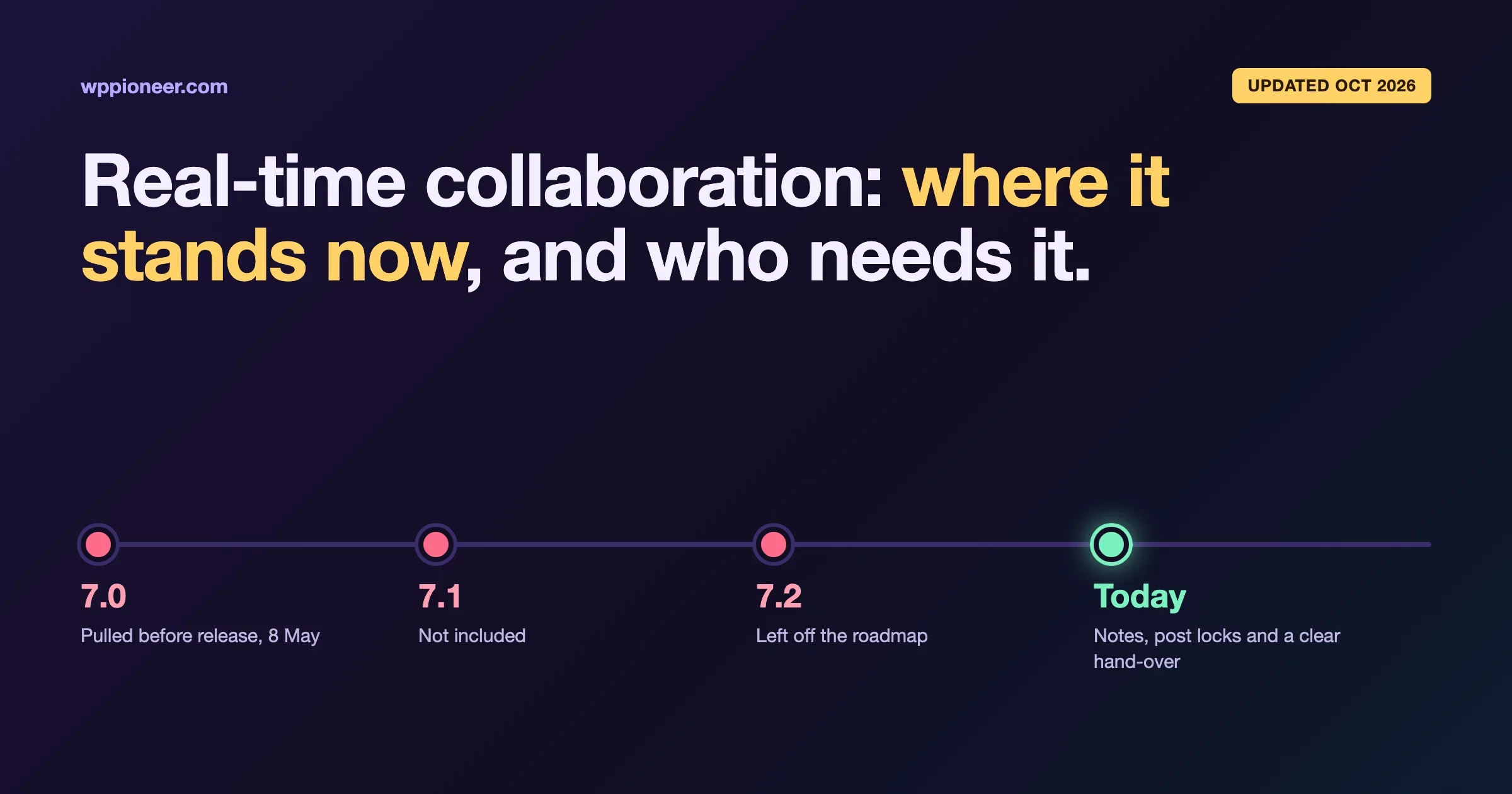
Updated 19 October 2026. When we first wrote this post in April, real-time collaboration was on track to ship in WordPress 7.0. It did not. It was removed from 7.0 in May, it was not in 7.1, and it is not on the roadmap for WordPress 7.2 either. The feature is being rebuilt from a different starting point. This update explains what happened in plain language, what you can use today if your team writes together, and the question this post always asked: who actually needs real-time editing at all?
If you run a site on your own, the short answer is still that this does not change much for you. If you have a team of writers and editors, there is a useful middle ground available right now, and it does not depend on real-time editing arriving.
What real-time collaboration means
Real-time collaboration, often shortened to RTC, means two or more people editing the same post at the same moment and seeing each other’s changes as they type. If you have used Google Docs with a colleague, you know the feeling: a coloured cursor with someone’s name on it, text appearing as they type, no “save and send” step.
WordPress has never worked that way. Today, when one person opens a post, WordPress puts a lock on it. If a second person opens the same post, they see a message that someone else is editing and can either wait or take over. That lock is simple, and it protects you from two people overwriting each other’s work. It also means only one person can write at a time.
What happened to real-time collaboration in WordPress 7.0?
Here is the sequence, using the WordPress project’s own announcements:
- Before May 2026: real-time editing was developed inside the block editor and planned as a headline feature of WordPress 7.0. This is when we wrote the first version of this post.
- 8 May 2026: the project announced that real-time collaboration was removed from WordPress 7.0. The reasons given were concerns about how much code it touched, timing bugs when edits arrive together, the load it puts on servers, memory use, and bugs that kept turning up in automated stress testing. The aim was to ship a stable 7.0.
- June to August 2026: work continued in the Gutenberg plugin, with a testing programme for real sites. It did not go into WordPress 7.1.
- 18 September 2026: the team explained a change of direction: every edit should go through your WordPress site, not just between browsers. The same day, the WordPress 7.2 roadmap said collaborative editing is intentionally left off 7.2, which is planned for early December.
- October 2026: three candidate designs, called sync engines, were published for testing in an experimental plugin, alongside a separate “who is online” plugin called the Presence API.
So the honest status is: real-time editing in WordPress is not coming in 2026 releases, the design is still being chosen, and nobody has given a release date.
Why was it pulled? The plain version
The first design synced edits directly between the browsers of the people editing. Your site only saw the finished post when someone pressed Save. That sounds efficient, but it caused three problems that matter to anyone running a site with more than one editor.
Problem 1: WordPress could not tell who wrote what
WordPress has roles for a reason. An Author is not allowed to add certain kinds of code to a post; an Administrator is. In the old design, if an Author added something they were not allowed to add, and an Administrator then saved the post to fix a typo elsewhere, the whole post was saved with the Administrator’s permissions. The Author’s content slipped through. That is a security hole, and the project’s September post used exactly this example.
Problem 2: anything outside the editor could wipe out work
Plenty of sites have plugins or scripts that update posts in the background: an import that refreshes prices, a scheduled job that adds a note, an AI tool that edits through the WordPress API. In the old design, those updates could not join a live editing session. A script that read a post at 9:00 and wrote it back at 9:03 would erase whatever two editors had typed in between.
Problem 3: a bad connection could lose someone’s work
If one editor’s internet dropped, kept working offline and then clicked Save before catching up, they could overwrite a colleague’s newer changes. In a newsroom or busy content team, that is the worst kind of bug: quiet, and only noticed when something is missing.
The fix: route everything through your site
The new direction is that every change goes to your WordPress site first. The site checks who sent it, checks they are allowed to make it, combines it with everyone else’s changes, saves it, and only then shares it. When two changes really clash, for example two people rewriting the same sentence, the plan is to set one aside and ask a person to choose, rather than guessing.
That is safer, and it is also more work for your server. This is the main reason it is taking time.
What does this mean for hosting?
This is the part most site owners should care about, because it affects cost. To keep everyone in sync, the editor has to check with the server regularly. The default in the test plugin asks every few seconds, for every person with the post open. On cheap shared hosting, each of those checks is a small PHP request, and your plan only allows so many at once. A few editors working together can add up to more load than your visitors do.
The team knows this. One of the principles they are building against is that cheap hosting is normal hosting: the feature has to work on an ordinary plan, with faster options for hosts that can offer them. The candidate designs differ a lot on this. One sends small descriptions of each change, one sends the whole post every ten seconds or so on save, and one sends compact data constantly for a more live feel. Which one wins will decide how much your host notices.
If you are on a budget host and real-time editing does arrive, expect it to be something you turn on deliberately for a team, not something every site uses by default.
Who actually needs real-time editing?
This was the question of the original post, and the answer has not changed much. Real-time editing is useful for a few kinds of teams, and close to irrelevant for most WordPress sites.
Teams that would use it
- Editorial teams of three or more. Newsrooms, content marketing teams and membership sites with several writers, where an editor and a writer regularly work on the same article. Many of these teams draft in Google Docs today and paste into WordPress at the end, which is where headings, links and formatting get lost.
- Breaking news or live coverage. Several people updating one post during an event is the clearest case for seeing each other’s edits as they happen.
- Agencies with clients who review in the editor. A writer drafts, the client reads along and fixes details. Today that usually means a call and a lot of “I’ve saved, can you refresh?”
- Larger organisations with sign-off steps. Legal, compliance or brand reviewers who need to change a line, not just comment on it.
Sites that would barely notice
- Solo bloggers. If you are the only person who writes, real-time editing does nothing for you.
- Small business sites. Usually one person updates the site, with the owner checking now and then. A quick review by email or a note in the editor covers it.
- Course creators. Lessons tend to be written by one person and reviewed once.
- Online shops. Product pages are rarely edited by two people at the same time. Stock and prices are admin tasks, not writing tasks.
- Portfolios and personal sites. One person, one post at a time.
If you are in the second group, the delay costs you nothing, and there is no reason to change your plans because of it.
What your team can use today instead
Most of what teams want from real-time editing is not actually typing in the same sentence at the same moment. It is leaving feedback in the right place, knowing who is working on what, and not losing work. WordPress already does a good part of that.
Notes: comments on blocks
WordPress 6.9 added Notes, which let you attach a comment to a specific block, reply in a thread, and mark it resolved. An editor can leave “check this figure” on the exact paragraph instead of in a separate email. We wrote a step-by-step guide to using Notes for team collaboration.
Notes keep improving. In the Gutenberg plugin’s October release, notes float in the margin next to the content, so you no longer have to keep the settings sidebar open to read them. The WordPress 7.2 roadmap makes suggestions the centrepiece for Notes: an editor proposes a change as a note, and the writer accepts or rejects it. Emoji reactions and a toolbar shortcut for adding notes are planned too. For many teams, suggest-and-accept is closer to what they really want than live typing.
Post locks: one writer at a time, on purpose
The lock that stops two people editing the same post at once is a feature, not a limitation, for most teams. Make it part of your process: the writer has the post until they hand it over, then the editor takes it. If someone takes over a locked post, the person who had it is told.
One habit makes locks much less frustrating: close the post when you are done with it. A post left open in a browser tab keeps its lock for a while, and the next person sees “someone is editing” even though nobody is. If that happens often on your team, agree that open tabs get closed at hand-over.
Editorial workflow plugins
If you need statuses beyond Draft and Published, such as “Ready for edit” or “Waiting for legal”, an editorial workflow plugin adds them, along with assignments and a calendar view. Pair that with a simple publishing calendar like the one in our content calendar and publishing workflow guide, and most small teams have everything they need.
Drafting together elsewhere, then pasting
If you really need two people typing at once today, drafting in a shared document and pasting into WordPress is still the practical answer. Paste one section at a time, check headings and links after each paste, and add images in WordPress rather than pasting them, so they go into your media library properly.
A simple workflow for a three-person team
Here is a setup that works well without real-time editing, for a writer, an editor and a site owner:
- Plan in the calendar. Each article gets a slot and an owner.
- The writer drafts in WordPress. They hold the post lock while writing, and save often.
- Hand over with a status. The writer sets “Ready for edit” (or tells the editor, if you have no custom statuses) and closes the post.
- The editor reviews with Notes. Small fixes are made directly; questions go in Notes on the relevant block.
- The writer answers the Notes. They reply, fix, and resolve each one.
- The owner approves. A final read, then publish or schedule.
Nobody overwrites anyone, every question is attached to the text it is about, and the process does not depend on a feature that has not shipped.
Can I try the new real-time editing now?
Yes, but only on a test site, never on your live site. The candidate designs are in an experimental plugin called Gutenberg Sync Engines, which needs the Presence API plugin and WordPress 7.0 or later. The plugin’s own description calls it “a decision tool, not a solution”. It is there so people can compare the designs and give feedback.
The easiest way to try it without touching your site is WordPress Playground, which runs a temporary WordPress in your browser. The Presence API project publishes a ready-made Playground setup that opens a post shared with two demo collaborators. If you are a developer or you build plugins, we went through what to test, with code, on our sister site in Real-Time Collaboration in WordPress: What Plugin Authors Should Test Now.
What is coming first: seeing who is online
The piece most likely to reach WordPress before real-time editing is presence: knowing who is logged in and which post they have open. The Presence API plugin is on WordPress.org now. It shows avatars of who is online in the admin bar, adds an Editors column to your posts list, and can label edits made by AI tools as coming from an agent rather than a person. It also keeps post locks out of the main database tables, which helps busy sites with caching.
The project has set a bar before it can be proposed for WordPress itself, and the earliest date that bar can be met is 3 December 2026. Even then, “proposed” is not “released”. Treat it as something to watch, not something to plan around.
Questions to ask your host before you plan for it
If your team is one of the groups that would use real-time editing, the time to check your hosting is before it arrives, not after editors start complaining that the editor feels slow. Send your host these questions:
- How many PHP workers does my plan have? Every editor with a post open will make regular requests. If your plan has a small number of workers, a handful of editors plus normal visitor traffic can use them all.
- Do you allow long-running connections? Some of the faster ways to sync edits keep a connection open for each editor. Many shared hosts close those quickly or do not allow them at all.
- Can you run a separate background process? The fastest option in the test plugin uses its own small server process. Managed WordPress hosts and VPS plans often can; basic shared plans usually cannot.
- Do you offer Redis? One of the options can use Redis to tell editors about changes faster. It is not required, but it helps on busy sites.
You do not need answers that say yes to everything. Every option falls back to the simplest method, regular checks, which works on any host. The answers just tell you whether your team will get the smooth version or the basic one.
Will my plugins work with it?
This is the question site owners usually forget. Real-time editing has to sync everything you can change in the editor, not just the text. Plugins that add their own boxes under the editor, such as SEO settings, custom fields or product details, need to be built in a way the sync can handle. Older plugins that still use the classic boxes below the editor are the most likely to need updates.
The test plugin already shows two things that affect what you can collaborate on:
- Some content types are left out. If a plugin adds its own content type, such as events, courses or listings, real-time editing is switched off for it unless the plugin turns on support for custom fields. Posts and pages are included.
- Plugin settings boxes have to opt in. A plugin can mark its settings box as safe for shared editing. Boxes that are not marked may not sync properly.
You do not need to do anything about this today. When real-time editing gets closer, check that the plugins your team uses in the editor have been updated for it, and test on a staging copy before you switch it on for everyone.
Should this change anything you are doing?
For most site owners, no. If you held off upgrading to WordPress 7.0 or 7.1 because of real-time editing, either to get it or to avoid it, that reason no longer applies. Upgrade on your normal schedule, with a backup and a test on staging first.
If you run a team, start using Notes properly now, settle on a hand-over process, and keep an eye on suggestions in WordPress 7.2. When real-time editing does arrive, a team that already works this way will get the most from it, because they will know exactly where live editing helps and where a clear hand-over is still better.
If you are weighing WordPress against newer content systems partly because of collaboration features, our EmDash vs WordPress comparison looks at how the two approaches differ more broadly.
Questions people ask
Is real-time collaboration in WordPress 7.0?
No. It was planned for 7.0 and removed on 8 May 2026, before release. It is not in 7.1 either.
Will it be in WordPress 7.2?
No. The 7.2 roadmap says collaborative editing is intentionally left off, while work continues alongside the release. WordPress 7.2 is planned for early December 2026.
When will it arrive?
There is no date. The team is choosing between three designs, then plans to release the chosen one as a feature plugin for wider testing first. A plugin you can install comes before anything in WordPress itself.
Can two people edit the same post today?
Not at the same moment. WordPress locks the post to one editor, and the second person can wait or take over. Two people can work on different posts at the same time without any problem.
What is the difference between Notes and real-time editing?
Notes are comments attached to blocks, read and answered at any time. Real-time editing is several people changing the text at once and seeing it happen. Notes are available today in WordPress 6.9 and later.
Will real-time editing slow my site down?
For visitors, it should not, because it only runs in the editor. It does add work for your server while people are editing, and on cheap hosting that can matter. Which design is chosen will decide how much.
Should I install the experimental plugin on my live site?
No. It is built for comparing designs and may have bugs. Use WordPress Playground or a throwaway test site.
No comments yet