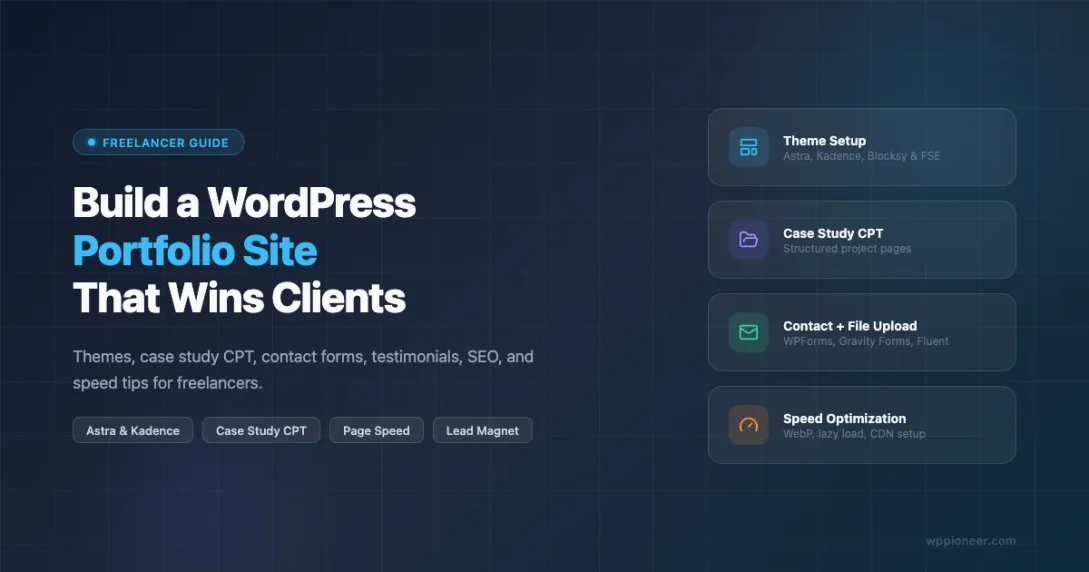
Your portfolio is the first thing a client sees. Before they read a word, they decide if you look credible. A good WordPress portfolio can bring in clients while you sleep. A bad one sends visitors away fast. This guide shows you every step, from picking a theme to speeding up images, so your portfolio does the selling for you.
What Makes a Portfolio Site Win Clients (vs Just Looking Nice)
A good-looking portfolio is not the same as a high-converting one. Nice portfolios show off visuals. Winning portfolios push visitors toward one clear action. Before you install a theme or pick colors, decide what you want visitors to do when they land on your site.
The best freelancer portfolios share a few key traits. They load fast on mobile. They make it easy to see what you do and who you help. They show proof from past clients. They give visitors one way to get in touch. Keep these goals in mind as you build.
Choosing Your WordPress Theme: Astra, Kadence, Blocksy, and Block Themes
Your theme is the foundation of your portfolio. Choose one that loads fast and gives you control over layout without locking you into a proprietary builder.
Astra
Astra is one of the most popular portfolio themes. The free version is very light (under 50KB). It loads fast and comes with starter templates you can import in one click. Some of those templates are built for freelancers. Astra works with Elementor, Spectra, and the block editor. The free plan is more than enough to start.
Kadence
Kadence is great if you want to work in the block editor. The free theme has a header builder and a footer builder. You also get a starter templates library with portfolio designs. The free Kadence Blocks plugin adds testimonial blocks, icon blocks, and layout tools. If you want a full toolkit at no cost, Kadence is a top pick.
Blocksy
Blocksy works a bit differently. It has a smart customizer that shows only the options for the part you are editing. The free version has overlay image styles, custom headers, and full-width layouts. The free content blocks extension adds hero sections and breadcrumbs. It is a good pick if you want a unique look without adding a page builder plugin.
Block Themes with Portfolio Templates
Full Site Editing (FSE) themes like Ollie, Frost, and Pixl come with portfolio page templates. You edit them in the Site Editor. They use WordPress’s native block system. No shortcodes, no lock-in. The only catch is that FSE themes have a learning curve if you are used to the old Customizer. But for a fast, clean portfolio, FSE themes are a solid choice in 2026.
For theme comparisons and more options, check the 10 best free WordPress themes that look premium in 2026.
Setting Up a Case Study Custom Post Type
Regular pages work fine for a small portfolio. But once you have more than five or six projects, a Custom Post Type (CPT) gives you much more control. You can filter by service type or industry. You can build archive pages. You can show projects anywhere on the site with blocks or shortcodes.
To register a Portfolio CPT, add the following to your child theme’s functions.php or to a small utility plugin:
function wpp_register_portfolio_cpt() {
    $labels = array(
        'name'               => 'Portfolio',
        'singular_name'      => 'Project',
        'add_new_item'       => 'Add New Project',
        'edit_item'          => 'Edit Project',
        'new_item'           => 'New Project',
        'view_item'          => 'View Project',
        'search_items'       => 'Search Projects',
        'not_found'          => 'No projects found',
        'menu_name'          => 'Portfolio',
    );
    $args = array(
        'labels'             => $labels,
        'public'             => true,
        'has_archive'        => true,
        'rewrite'            => array( 'slug' => 'work' ),
        'supports'           => array( 'title', 'editor', 'thumbnail', 'excerpt', 'custom-fields' ),
        'show_in_rest'       => true,
        'menu_icon'          => 'dashicons-portfolio',
    );
    register_post_type( 'portfolio', $args );
}
add_action( 'init', 'wpp_register_portfolio_cpt' );
Setting show_in_rest to true makes your projects work in the block editor. Setting has_archive to true gives you a /work/ page that lists all projects automatically.
You can also add a custom taxonomy so visitors can filter by service:
function wpp_register_service_taxonomy() {
    register_taxonomy( 'service_type', 'portfolio', array(
        'label'        => 'Service Types',
        'rewrite'      => array( 'slug' => 'service' ),
        'hierarchical' => true,
        'show_in_rest' => true,
    ) );
}
add_action( 'init', 'wpp_register_service_taxonomy' );
For a deeper dive into CPTs including archive templates and WP_Query examples, see Custom Post Types in WordPress: when, why, and how to create them.
Building the Hero Section and Lead Magnet
The hero section is the first thing a visitor sees on your homepage or portfolio landing page. It needs to answer three questions in under five seconds: what do you do, who do you do it for, and what should I do next.
A high-converting hero for a freelancer typically includes:
- A headline that names your specialty and a benefit (not just a job title)
- A subheadline that briefly describes who you help and how
- One primary call to action button
- A supporting image or short video (your face or a relevant project screenshot)
Example headline: “I build fast WordPress sites for independent consultants who need a professional online presence in 30 days.”
A lead magnet adds a second reason for visitors to engage even if they are not ready to hire you yet. Good lead magnets for freelancers include a free audit checklist (“5 Things Killing Your Website Performance”), a case study PDF of your best project, or a short video walkthrough of your process. Use a plugin like Mailchimp for WordPress or FluentForms to connect the opt-in form to your email list. Keep the lead magnet form simple: first name and email only.
Place the lead magnet below the hero but above the project grid. Visitors who scroll past the CTA but are still reading are research-mode prospects. Capturing their email keeps you in front of them.
Adding a Contact Form with File Upload
Your contact form is a conversion tool, not just a courtesy. Design it to qualify leads and reduce back-and-forth messages.
Include these fields as a minimum:
- Name
- Project type (dropdown: New site, Redesign, Performance fix, Ongoing maintenance)
- Project description (textarea)
- File upload (for briefs, wireframes, or brand guides)
- Budget range (dropdown, optional)
WPForms supports file uploads. So does Gravity Forms. Fluent Forms has file upload fields on its free plan. Set the upload to accept PDF, DOCX, and images. Cap the file size at 10MB to avoid timeouts.
After someone submits the form, send them to a thank-you page. Not just a message on the same page. The thank-you page should confirm you got the message and tell them when you will reply. Give them one thing to do while they wait, like reading a case study. Track the thank-you page URL in Google Analytics as a goal.
Spam is common on portfolio forms. Add a honeypot field to catch bots. Use reCAPTCHA v3 instead of v2 so real clients are not slowed down. Both WPForms and Gravity Forms have these options built in.
Building a Testimonials Section That Builds Trust
Testimonials are one of the best trust signals for a freelancer. But most sites show them badly. Tiny text, no photo, no context, and a slider that moves too fast to read.
A better way: use a static grid of testimonial cards. Each card should have a client photo or logo, their name and job title, what result they got, and a short quote. Be specific. “Working with [name] doubled our leads in 60 days” is much stronger than “Great work, highly recommend.”
To add testimonials in WordPress, you have two choices. Use the Testimonial block from Kadence Blocks or Stackable. Or create a Testimonials CPT and show it with a Query Loop block. Both work well.
Schema markup matters here. Google can show star ratings in search results when you use Review schema. That means more clicks even if your rank stays the same. Use Rank Math or Yoast SEO to add this schema to your testimonials section.
Video testimonials beat text alone. A 60-second Loom video from a happy client feels more real than any written quote. Ask for a short video after you finish each project.
Results-Driven Design: Show Outcomes, Not Just Work Samples
The biggest mistake freelancers make is showing what they built but not what changed for the client. A nice website screenshot says nothing about what hiring you will do for someone’s business.
Each case study should follow a simple story:
- The problem the client had before hiring you
- The approach you took and why
- The specific outcome (numbers where possible)
- A quote from the client about the experience
You do not need big numbers. Even a simple time saving works: “Before the redesign, updating the site took 4 hours a week. After, it takes 20 minutes.” That kind of detail makes a case study convincing.
For visual work, a before/after image slider shows the change clearly. The Twentig plugin adds this block to Gutenberg for free. Spectra (also free) has a before/after slider with a drag handle. Keep both images the same size and label them clearly.
SEO Basics for a Portfolio Site
A portfolio that ranks in search brings in leads for free. Focus on a few specific keywords. Do not try to rank for big broad terms.
Good keyword patterns to target:
- “WordPress developer for [industry] in [city]”
- “hire freelance [your specialty] for [platform]”
- “WordPress maintenance for [niche]”
Put your main keyword in the page title, the first H2, the meta description, and once in the first paragraph. Do not repeat it too much. Use Rank Math or Yoast SEO to check your on-page signals.
Case study pages are SEO assets too. A page titled “How I Cut Load Time by 60% for a Law Firm” can rank for searches like “WordPress speed fix for law firms.” Over time, your case studies bring in the right clients.
Add an XML sitemap, link your site to Google Search Console, and submit your sitemap after launch. For the full setup steps, see the WordPress SEO basics guide for beginners.
Page Speed for Portfolio Images
Portfolio sites live and die on images. But big screenshots and logo files are also the most common reason portfolio sites are slow. A two-second delay can cost you 15% of visitors before they see your work.
Follow these steps to keep your portfolio fast:
Serve WebP or AVIF formats
WordPress 6.1 and later can make WebP versions of your images. Check your media settings for the option. If it is not there, install Imagify or ShortPixel to convert images on upload.
Set proper dimensions before uploading
Resize screenshots before you upload them. Full-width images should be around 1200px wide. Grid thumbnails work at 800px. Do not upload a 4000px image and let WordPress shrink it. That wastes storage and slows things down.
Use lazy loading
WordPress has added lazy loading to images since version 5.5. It adds loading=”lazy” to images that are below the fold. Make sure your theme is not turning this off. Open browser DevTools and check the Network tab to confirm it is working.
Use a CDN
A CDN (content delivery network) serves your images from a server near the visitor. Cloudflare’s free plan handles caching and image compression with no code needed. BunnyNet CDN is also affordable and works well on image-heavy sites.
For a complete guide to image compression and load speed, see how to compress WordPress images so pages load in under 2 seconds.
Hosting Recommendations for Freelancer Portfolios
Hosting affects how fast your site loads and how easy it is to manage. For a portfolio with under 10,000 visits a month, managed WordPress hosting is the smart choice. You get automatic backups, staging, and SSL without touching a server.
Cloudways
Cloudways lets you run WordPress on cloud servers like DigitalOcean or Vultr. You get a simple control panel to manage everything. Plans start at around $14/month. You get PHP 8.x, built-in caching, free SSL, and staging. If you host client sites too, Cloudways is cost-effective because you can run several sites on one server.
Kinsta
Kinsta is a premium host built on Google Cloud. Sites load fast and support is WordPress-only. The entry plan is $35/month and covers one site with up to 25,000 monthly visits. If you want zero server hassles, Kinsta is worth it.
SiteGround
SiteGround’s StartUp plan starts at $3.99/month (renews higher). You get SG Optimizer for caching, daily backups, free SSL, and staging. It performs well for a shared host. Upgrade when your traffic grows.
WP Engine
WP Engine is a good fit if you also host client sites. Agency plans include a client portal and staging transfers. The entry plan is $25/month for one site. The platform is reliable and support is strong.
Launching Your Portfolio: A Pre-Publish Checklist
Before you share your portfolio link with anyone, run through this checklist:
- All case study images are compressed and under 200KB each
- Homepage loads in under 2 seconds on mobile (test at PageSpeed Insights)
- Contact form test submission delivers an email to your inbox
- File upload in the contact form works on mobile and desktop
- SSL certificate is active (lock icon in browser, no mixed content warnings)
- Analytics is installed (Google Analytics 4 or Plausible)
- XML sitemap submitted to Google Search Console
- All internal links point to live pages (no 404s)
- Favicon and Open Graph image are set (for social sharing previews)
- Testimonials include real names and ideally photos
- Each case study has at least one specific outcome or metric
Ongoing Maintenance After Launch
A portfolio site needs less upkeep than a blog, but it is not set-and-forget. Schedule a 30-minute check each month to cover:
- Update WordPress core, themes, and plugins
- Test the contact form to confirm submissions arrive in your inbox
- Check Google Search Console for crawl errors or manual actions
- Add at least one new case study per quarter to show recent work
- Update your homepage “Available for work” status as needed
A portfolio that shows recent work tells clients you are active and available. Stale projects from three years ago make people wonder if you are still taking work.
Another easy win: add a “Recent work” widget or block to your sidebar or footer. It takes five minutes to set up with a Query Loop block filtered to your Portfolio CPT. It updates on its own every time you add a new project.
You should also review your analytics every quarter. Which case study pages get the most traffic? Which ones lead to contact form submissions? Double down on the topics and services that bring in real inquiries. If a certain service type drives most of your leads, consider writing more content around it or making it more prominent on your homepage.
Pricing and Services Page: Should You Show Rates?
Showing prices on your portfolio is a real choice. For: you filter out low-budget leads, clients who contact you are ready to spend, and honesty builds trust. Against: project scope varies, and a fixed price might confuse clients before you know what they need.
A good middle ground is “Starting from” pricing for set packages. For example:
- Portfolio site setup, starting from $1,200
- WordPress speed optimization audit and fix, starting from $499
- Monthly maintenance and support, starting from $149/month
These prices set a floor without locking you into a fixed quote. A “starting from $1,200” line tells premium clients you are not a $99 gig. It tells budget shoppers to move on. Both outcomes save you time.
Keep your services page about the client’s problem, not your tools. “I help consultants look credible online so they win better contracts” works much better than listing your tech stack.
Social Proof Beyond Testimonials: Case Study Metrics, Logos, and Press
Testimonials are one form of social proof, but there are several others that add credibility to a portfolio site.
Client logos
A row of recognizable client logos near the top of your portfolio page does a lot of work quickly. Even if the brands are not household names, logos signal that real businesses have trusted you. Ask clients for permission to use their logo before displaying it. Display logos in grayscale to keep the visual weight consistent and prevent clashing colors.
Metrics bar
A simple row of numbers can summarize your track record at a glance. Examples: “47 sites launched / 6 years building WordPress / 100% of clients on Clutch recommend” or “Average PageSpeed score improvement: +42 points.” Keep the numbers honest and specific. Vague metrics like “100% client satisfaction” are ignored. Specific ones like “average project delivered 3 days ahead of schedule” are believed.
Publications and mentions
If your work has been mentioned in a blog post, podcast, newsletter, or industry publication, add an “As seen in” section. Even a niche WordPress community newsletter carry weight with the right audience. Links to third-party mentions are the strongest form of social proof because they are independently verifiable.
Clutch and LinkedIn reviews
Third-party reviews carry more weight than quotes on your own site. People know you did not write them. Create a free Clutch profile and ask past clients to leave reviews. Link to it from your testimonials section. Even two or three verified reviews can lift your conversion rate.
Final Thoughts
Building a WordPress portfolio that wins clients is not about having the most beautiful design or the most features. It is about clarity, speed, and evidence. Pick a fast theme, set up a case study CPT to keep your work organized, write case studies that highlight outcomes, make it easy to contact you, and keep your images lean. Those fundamentals outperform elaborate animations and complex navigation every time.
Your portfolio is a living document. Every new project you add, every testimonial you collect, and every case study you refine makes it a stronger selling tool. Start with what you have, publish it, and improve it as you go. The freelancers who win the best clients are not the ones with the fanciest sites. They are the ones who make it easiest for the right clients to say yes.
Beginner WordPress Tips freelancer website Full Site Editing portfolio theme WordPress WordPress portfolio site
Last modified: May 8, 2026