A Critical Flaw in the Library That Opens iPhone Photos on Your Server

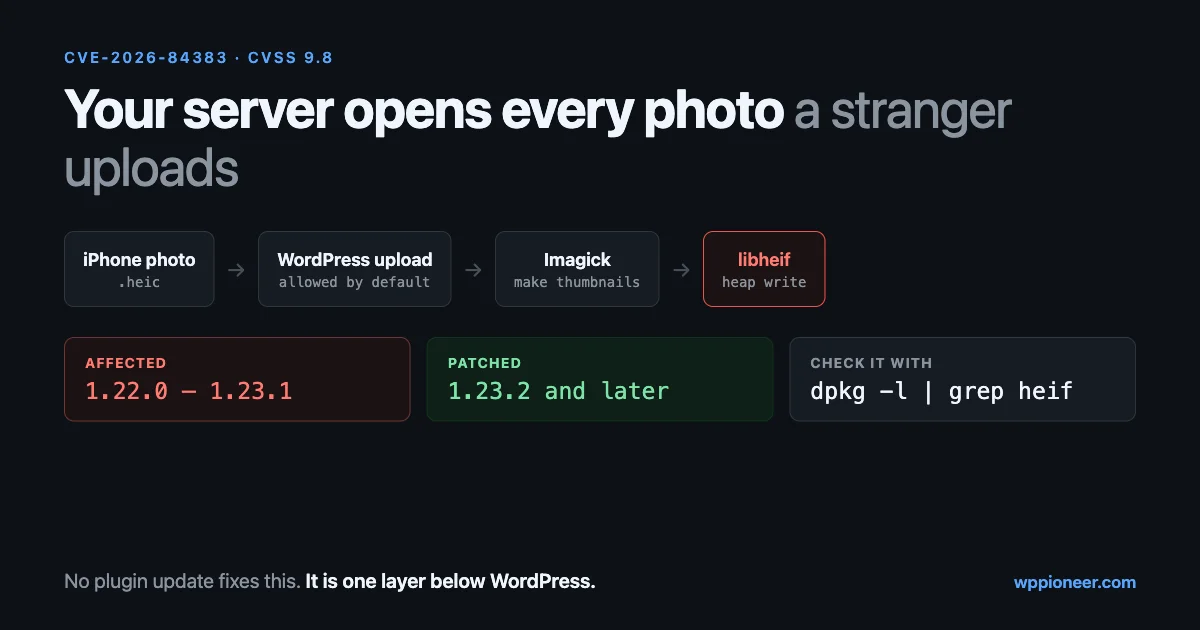
Someone uploads a photo straight from an iPhone. Your site accepts it, makes the usual thumbnails, and shows it in the gallery. Nothing about that looks like a security event.
On 18 September a critical flaw was published in the library that does the opening. CVE-2026-84383 is a heap out-of-bounds write in libheif, scored 9.8 out of 10, and libheif is what most Linux servers use to read HEIC and AVIF files. Wordfence, whose Argus system found it, demonstrated protected-file disclosure and code execution against one exact WordPress deployment.
This is not a WordPress vulnerability, and there is no plugin update that fixes it. It is a vulnerability in something WordPress asks to open files on your behalf, which makes it easy to miss and worth twenty minutes of your time this week. This guide explains who is exposed, how to check your own server in three commands, how to patch it, and what to do if you cannot patch today.
What was actually found
The technical summary, from the National Vulnerability Database entry:
- Affected: libheif from 1.22.0 up to but not including 1.23.2
- Fixed in: 1.23.2, released 25 August 2026. Two later security releases followed, 1.23.3 on 1 September and 1.23.4 on 6 September
- Score: CVSS 3.1 base 9.8, vector
AV:N/AC:L/PR:N/UI:N/S:U/C:H/I:H/A:H - Mechanism: a crafted HEIF, HEIC or AVIF file using nested
idenandauxlreferences makes the decoder append duplicate alpha planes with different bit depths, after which a scaling step writes past the end of the buffer it allocated
Read that vector string once, because it is the part that matters for a website. AV:N means it can be reached over the network. PR:N means no privileges are needed. UI:N means nobody on your side has to click anything. If a stranger can get a file to your decoder, the preconditions are met.
Wordfence is careful to say that a working exploit is target-specific: it depends on the exact library build, the memory layout and the platform. They named the wider technique HEIF Heist, and the part worth absorbing is the two-step shape. An attacker probes an upload endpoint with crafted files to work out which libheif version family is in use, then sends a payload matched to that version. Fingerprint, then fire.
Why this reaches WordPress at all
Two defaults combine here, and both are reasonable on their own.
WordPress accepts HEIC uploads out of the box. Core’s list of allowed file types has included the Apple photo formats for several releases now:
'heic'  => 'image/heic',
'heif'  => 'image/heif',
'heics' => 'image/heic-sequence',
'heifs' => 'image/heif-sequence',
That is from wp_get_mime_types() in wp-includes/functions.php, and avif sits a few lines above it. Nobody has to enable anything.
WordPress opens every image it accepts. An upload is not stored and forgotten. Core reads the dimensions, applies the big-image threshold, generates every registered size, and converts HEIC to JPEG so browsers can display it. All of that means decoding the file. When the Imagick extension is available, that decoding goes to ImageMagick, and ImageMagick reads HEIC through libheif.
So the chain is: a stranger’s file, your server’s decoder, a library with a critical flaw in it. The upload does not need to be published, approved or even visible. It only needs to be processed, which happens the moment it arrives.
Why one photo is really a small filesystem
It helps to know why image decoders keep producing flaws of this severity, because “it is just a photo” is the intuition that makes this easy to dismiss.
A JPEG is roughly one image plus some metadata. HEIC is not that. It is a container in the same family as MP4, and inside it are items: the main picture, a thumbnail, sometimes a depth map, sometimes an alpha channel, sometimes several pictures for a burst or a live photo. Items reference other items. A derived image can say “I am this other item, transformed”, and an auxiliary link can say “this item is the alpha channel belonging to that one”. Those two reference types, iden and auxl, are the ones named in this CVE.
That means opening a HEIC is not reading pixels in a line. It is parsing a graph of references, resolving what points at what, allocating buffers of the right shape, and then filling them. The flaw here is a mismatch between those last two steps: the reference graph is crafted so the decoder ends up with two alpha planes of different bit depths for the same image, then a scaling routine allocates a buffer sized for one of them and writes the other. Memory past the end of the buffer gets overwritten, and what sits in that memory decides whether the result is a crash or something worse.
Nothing about that requires the file to look unusual to a person. It has a normal extension, a sensible size, and it may well display correctly in a preview. All the interesting structure is in the container.
What WordPress does with a HEIC upload
Worth knowing in order, because each step is a place the file gets opened:
- Type check. WordPress checks the real file signature, not just the extension, and maps it to a HEIC mime type.
- Dimensions. Core asks its image editor for the width and height. For HEIC that means decoding the file.
- Conversion. Core’s default output mapping converts HEIC and HEIF to JPEG, so browsers can display the result. Another decode, then an encode.
- Sub-sizes. Every registered image size is generated from the original, so a site with a theme, WooCommerce and a gallery plugin can decode and re-encode the same photo many times over.
- Storage. The JPEG versions are what your visitors see. The original HEIC stays on disk.
Two consequences follow. The processing happens at upload time, before any human reviews anything, so “we moderate member photos” is not a control here. And the work is repeated per registered size, which is also why HEIC uploads are slow on shared hosting, and why they make the uploads folder grow faster than people expect.
Who is actually exposed
If you are the only person who ever uploads anything, and you only upload your own photos, your practical risk is low. The exposure rises with every route that lets someone else put a file on your server:
- Community and membership sites. Profile photos, cover images, galleries and post attachments, uploaded by members you have never met.
- Anything with contributor or author accounts. A multi-author blog hands the media library to people outside your team.
- Forms with file fields. Job applications, support attachments, competition entries, proof-of-purchase uploads.
- Course sites with assignments. Students submitting work is a file upload with a friendly name.
- Stores that accept customer artwork. Print, engraving, personalised products.
- Anything with open registration plus a plugin that grants upload rights. This is the one people forget, because the capability came with a plugin rather than a decision.
Phones produce HEIC by default, so on any site where real people upload real photos, these files are already arriving.
Step 1: find out whether your server can decode HEIC
Your site is only in scope if something on the server actually opens these files. Three commands answer that, over SSH from your site’s root.
Does PHP’s Imagick support HEIC?
php -r 'if ( class_exists( "Imagick" ) ) {
    print_r( Imagick::queryFormats( "HEI*" ) );
    print_r( Imagick::queryFormats( "AVIF" ) );
} else {
    echo "Imagick not installed\n";
}'
An array containing HEIC or HEIF means the decoder is wired up and in scope. An empty array, or no Imagick at all, means PHP is not reaching libheif this way.
Which libheif is installed?
# Debian and Ubuntu
dpkg -l | grep -i heif

# RHEL, Alma, Rocky
rpm -qa | grep -i heif

# If the tools are installed
heif-info --version
Compare what you get against the table above. Anything from 1.22.0 to 1.23.1 is the affected range. Below 1.22.0 you are outside this particular flaw, though an old library has its own problems, and 1.23.2 or later is patched for this one.
Is ImageMagick using it?
convert -list format | grep -i -E 'heic|heif|avif'A line with rw or r against HEIC confirms ImageMagick can read the format. On newer builds the command is magick -list format.
If you are on managed hosting with no SSH, you cannot run these, and that is fine: ask your host directly whether their image stack includes libheif and which version it is on. A host that cannot answer that question quickly has told you something useful too.
Step 2: patch the library
The fix is an operating system package update, not a WordPress one:
# Debian and Ubuntu
sudo apt update && sudo apt upgrade libheif1

# RHEL family
sudo dnf update libheif
Then restart PHP so the new library is loaded, since a long-running PHP-FPM pool keeps the old one mapped:
sudo systemctl restart php8.3-fpm # match your versionDistributions often backport security fixes without changing the version number you see, so a package that still reports 1.22.x may already carry the patch. Check your distribution’s security tracker for CVE-2026-84383 rather than judging by the version string alone.
Three situations need different handling:
- Containers. Updating inside a running container is temporary. Rebuild the image from a refreshed base and redeploy, otherwise the next deployment brings the old library back.
- Managed and shared hosting. You cannot patch it yourself. Open a ticket that names the CVE and asks for the installed libheif version. Naming the CVE moves the ticket faster than “is my site safe”.
- Old distributions past end of support. No patch is coming. That is a hosting decision, not an image decision.
Step 3: if you cannot patch today, shrink the surface
These are mitigations, not fixes. Any of them reduces what a crafted file can reach while you wait on a patch or a host.
Stop accepting HEIC uploads
If your audience uploads photos from phones, this is disruptive, and you should say so in your upload instructions rather than letting uploads fail silently. If HEIC is not something you need, remove it:
add_filter( 'upload_mimes', 'wpp_drop_heic_uploads' );

function wpp_drop_heic_uploads( $mimes ) {
	unset( $mimes['heic'], $mimes['heif'], $mimes['heics'], $mimes['heifs'] );

	return $mimes;
}
Put that in a small site-specific plugin rather than your theme, so it survives a theme change. Note what it does and does not do: it stops WordPress accepting the format through its own upload paths. A plugin that writes files by another route, or a form handler that saves attachments itself, needs checking separately.
Tell ImageMagick not to open them
ImageMagick has a policy file, usually at /etc/ImageMagick-6/policy.xml or /etc/ImageMagick-7/policy.xml, that can refuse specific formats outright:
<policy domain="coder" rights="none" pattern="HEIC" />
<policy domain="coder" rights="none" pattern="HEIF" />
This is server-wide, so it affects every site on the box, and it is the same mechanism administrators have long used to disable riskier coders. Restart PHP afterwards. If WordPress then cannot read the dimensions of a HEIC upload, the upload fails rather than being processed, which is the intended outcome here.
Check who can upload at all
Open Users and look at roles with fresh eyes. Authors and contributors with upload rights, old accounts nobody uses, and plugins that grant upload_files to subscribers are all worth a second look. Our guide to WordPress user roles covers how to audit that properly. The smaller the set of people who can hand your server a file, the smaller this problem is.
Step 4: check whether anything already happened
Exploitation here is target-specific and noisy when it fails, which is helpful. A crafted file that does not quite fit the memory layout tends to crash the decoder rather than succeed quietly.
Look for the crashes:
# PHP and web server logs, last week
sudo grep -i -E 'segfault|imagick|imagemagick|heif' /var/log/syslog /var/log/php*.log 2>/dev/null | tail -40
Repeated segmentation faults in a PHP worker around upload times deserve attention. So does a run of HTTP 500 responses on your upload endpoint from one address.
Then check the uploads folder for things that are not media, which is worth doing periodically anyway:
find wp-content/uploads -type f -name '*.php'A PHP file inside uploads is never normal except for the empty index files some plugins leave behind. If you find one you cannot explain, work through our hacked site guide rather than deleting it and moving on. While you are in that folder, our uploads audit covers what else accumulates there.
Finally, confirm your core and plugin files match their official copies:
wp core verify-checksums
wp plugin verify-checksums --all
What this class of bug means for your site generally
Media handling is the one place where an ordinary website deliberately runs complex parsing code over files that strangers chose. Image formats are containers with nested structures, references, colour profiles and metadata, and the libraries that read them are written in C for speed. That combination has produced critical flaws before and will again.
Three habits make the next one less interesting:
- Know your image stack. Write down which extension handles images on your server, which library it wraps, and where you would check the version. Ten minutes once beats an hour of searching mid-incident.
- Accept only formats you need. Every format in your allowlist is a parser you have enabled. If nobody uploads AVIF, do not accept AVIF.
- Treat OS packages as part of your site. Plugin updates get a weekly ritual and library updates get forgotten, but they run the same risk. Unattended security upgrades on a VPS cost nothing and cover exactly this case.
Community sites: the extra shape of this problem
On a site where members upload, three things change at once. The volume of uploads is higher, the uploaders are anonymous to you, and the uploads arrive continuously rather than when you sit down to write a post. Phone photos are the normal case rather than the exception, so HEIC files are already in your pipeline.
We build BuddyNext for communities, and its profile media and albums run on MediaVerse, which handles member uploads. One setting is directly relevant here: Allowed File Types, a comma-separated list of MIME types that member uploads are checked against. Its default is image/jpeg, image/png, image/gif, image/webp, video/mp4, video/webm, audio/mpeg, audio/ogg. HEIC is not on that list, so a member upload of an unconverted iPhone photo is refused rather than decoded.
That default is worth copying whatever software you run. An allowlist of formats you have chosen is a smaller attack surface than “whatever WordPress accepts”, and it is a setting rather than a code change. The matching caution: check every other upload route on the same site. A forms plugin, a support widget or a marketplace listing field can each have its own allowlist, and they are rarely consistent with one another.
Questions people are asking about this one
My images are on a CDN. Does that protect me?
No. A CDN changes how finished images are delivered to visitors. The dangerous step happened earlier, when your server opened the uploaded file to make those images. If uploads still land on your server and get processed there, a CDN makes no difference to this.
What about offloading media to cloud storage?
Same answer, with one exception. Tools that copy files to object storage after WordPress has processed them do not help, because processing came first. A setup where the upload goes straight to a third-party service that does the decoding moves the risk to that provider, which is a real difference, though now you are relying on their patching instead of yours.
Does a firewall plugin cover it?
Partly, and not in a way you should lean on. A firewall can block known-bad requests and rate-limit an address probing your upload endpoint, which raises the cost of the fingerprinting step. It cannot inspect the inside of a container format and decide whether the reference graph is hostile. Patching the library is the fix; the firewall buys time.
Should I just tell people to stop uploading HEIC?
You can make that mostly unnecessary. On an iPhone, Settings > Camera > Formats > Most Compatible makes the camera shoot JPEG instead, and on a Mac, Preview exports HEIC to JPEG in a couple of clicks. That is a fine line to include in your upload instructions for a members’ site. It is a request, though, not a control: the only thing that decides what reaches your decoder is your allowlist.
Is AVIF affected as well, or only HEIC?
Both. The vulnerability description names crafted HEIF, HEIC and AVIF files, because libheif reads all three, and AVIF is in WordPress’s default allowlist too. That matters because AVIF is being recommended everywhere as the modern format for page speed, so sites that would never expect an iPhone photo may still be accepting files that take the same code path. If you drop HEIC from your uploads while you wait for a patch, consider whether AVIF uploads from strangers are something you need either.
I run WordPress locally for development. Does this matter?
Less, but not zero. A local environment usually has the same image stack as production, and developers do open sample files from clients and download test assets. Patch it when you patch everything else.
The twenty-minute checklist
- Run the three commands in step 1 and write down the answers.
- If libheif is between 1.22.0 and 1.23.1, patch it and restart PHP.
- On managed hosting, open a ticket naming CVE-2026-84383 and ask for the installed version.
- On containers, rebuild the image rather than patching the running one.
- If you cannot patch today, drop HEIC from your allowed uploads or deny the coder in ImageMagick’s policy file.
- Review who holds upload rights, including rights granted by plugins.
- Check every upload route separately: media library, forms, profiles, product fields.
- Grep your logs for decoder crashes around upload times.
- Check uploads for PHP files, and run both checksum commands.
- Turn on unattended security updates for OS packages if your host leaves that to you.
The reason to spend twenty minutes on this rather than waiting for a plugin update is that no plugin update is coming. The fix lives one layer below WordPress, in a library most site owners have never heard of, doing a job nobody thinks of as risky: opening a photo.