What a WordPress Plugin Can Actually Do to Your Site

You find a plugin that does the thing you need. Good reviews, decent install count, updated recently. You click Install, then Activate, and move on with your day.
That click is a bigger decision than the interface makes it look, and almost nobody explains what you just agreed to. So here it is, in plain English.
What activating a plugin actually grants
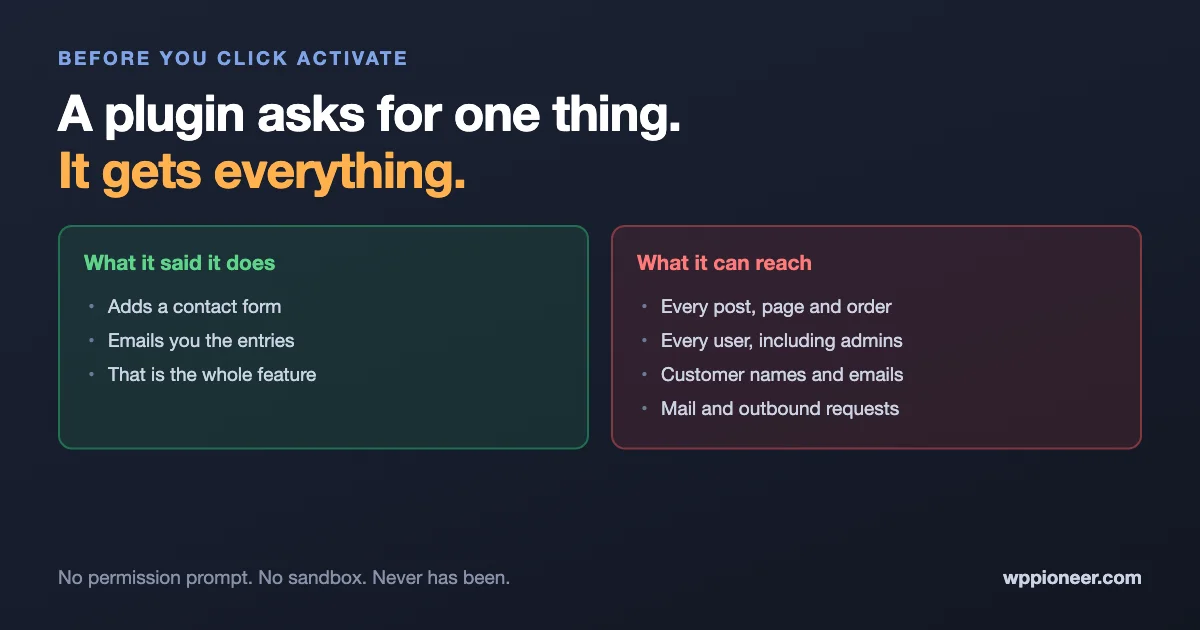
An active WordPress plugin runs on every single page load, with the same access as WordPress itself. There is no permission screen, no list of what it wants, and no boundary keeping it inside the feature you installed it for.
In practice, an active plugin can:
- Read and change any post, page, product or comment on your site.
- Create, edit or delete user accounts, including administrators.
- Read anything in your database, which includes customer names, email addresses, order details and anything a form plugin has ever collected.
- Send email from your site, as your site.
- Make requests out to the internet, sending whatever it likes to wherever it likes.
- Read and write files on your server.
- Change your site settings, including who is allowed to register.
A contact form plugin does not need most of that. It gets it anyway. WordPress has no mechanism for saying “this plugin may only touch forms”, the way your phone can say an app may use the camera but not your contacts.
This is not a flaw somebody forgot to fix. It is how WordPress has always worked, and it is a large part of why the plugin ecosystem is so capable. But it means the decision you are making at install time is a trust decision, not a feature decision.
Which makes the real question “who”, not “what”
Since every plugin gets essentially the same access, comparing what two plugins are allowed to do is pointless. They are allowed to do everything.
What actually differs is who is behind it and whether they are still paying attention. That is the thing worth evaluating, and it is the thing the plugin directory makes hardest to see.
The one that stopped being maintained is the real risk
Most people worry about installing something malicious. That happens, but it is rare. The far more common story is dull: a plugin that was perfectly good in 2021, whose author moved on, sitting on a site four years later with a flaw nobody is going to fix.
It does not announce itself. It keeps working exactly as before. The reviews still say five stars. And when a vulnerability is found in it, there is no update coming, because there is nobody left to write one.
On the plugin’s page in your dashboard, look for the last updated date and whether it has been tested with a recent WordPress version. If either is more than a year behind, that is your signal, regardless of how well it appears to work.
Even a good plugin can turn
In late July 2026 a video-embedding plugin with around twenty thousand active installs had a backdoor added to it. Not a bug: deliberately hidden code that would have let anyone log in as an administrator.
The plugin was legitimate. It was in the official directory. People had installed it years earlier and it had been fine the entire time. What changed was that someone got access to the developer’s account and pushed a bad update. It was caught within two hours and never actually reached anyone’s site, so nobody was harmed. But the shape of it is worth understanding, because “only install from the official directory” protects you at the moment you choose a plugin, not for every update afterwards.
None of which means you should stop updating. Being behind on updates is a far bigger risk than a poisoned update, by an enormous margin. It means the trust you are extending is ongoing rather than one-off.
Why the number matters more than the names
Every active plugin is another author whose account security you are relying on, and another codebase that has to keep being maintained.
Twenty plugins is twenty of those relationships. It does not matter that each individually looked fine when you installed it; what matters is that the chance of at least one being abandoned, or one developer account being compromised, goes up with every one you add.
This is the practical reason to keep the list short, and it is a better reason than the usual one about page speed. Our guide to the plugins a beginner actually needs is a good pass to make: most sites run several that solve a problem they no longer have.
Deactivating is not the same as deleting
This one catches almost everyone. A deactivated plugin is not running, but its files are still sitting on your server, and it still appears in your updates list.
That matters for two reasons. Its files can sometimes still be reached directly by someone who knows the path, depending on how it was written. And because it is deactivated, you are far less likely to keep it updated, so it quietly becomes the oldest code on your site.
If you are not using it, delete it. You can always install it again. Deactivating is for testing, not for storage.
Five questions before you install anything
None of these take more than a minute, and together they filter out most of what goes wrong.
- When was it last updated? Anything past a year without an update, on a plugin that is not trivially simple, is a maintenance question you should answer before installing.
- Is there a real person or company behind it? Click through to the author. A named developer or a company with a support channel is a very different proposition from an anonymous account with one plugin.
- Do I need this permanently, or once? Plugins that do a one-time job, such as a migration or a bulk edit, should be deleted when the job is done rather than left active forever.
- Does something I already have do this? A surprising amount of plugin sprawl is two plugins overlapping, or a feature that arrived in WordPress core since you installed the plugin that provided it.
- What happens to my site if this disappears tomorrow? If the answer is “my checkout stops working”, that is a plugin worth paying for, so somebody is contractually obliged to keep maintaining it.
What to actually do about it
Not much of this requires effort, which is the good news.
Do an audit once a year. Open your Plugins screen and go down the list asking, for each one, whether you still use it. Delete what you do not. Most sites can remove a third of the list without noticing.
Keep updates on. Automatic updates for plugins you trust, and a habit of applying the rest promptly. The maths is not close: outdated software is how the overwhelming majority of WordPress sites get compromised.
Limit who can install. Only administrators can add plugins. Make sure the people who have that role actually need it, and that each of those accounts has a strong unique password and two-factor authentication turned on. A stolen administrator password is a plugin install.
Have a backup you have restored from. Not one you assume works. One you have actually restored to a test site at least once, so you know it does.
Know what a problem looks like. If something ever does go wrong, the signs a site has been compromised are mostly quiet ones, and worth being able to recognise.
Frequently asked questions
Are plugins from the official WordPress directory safe?
Safer, not safe. Plugins in the directory are reviewed when first submitted and the team removes ones found to be malicious, which is real protection. But updates are not individually reviewed the way an app store reviews releases, so the directory is a filter rather than a guarantee.
Is a paid plugin safer than a free one?
Often, though not because of the code. Paying creates an obligation to keep maintaining it and a business that suffers if it stops. For anything your site genuinely depends on, that ongoing commitment is usually worth the money.
How many plugins is too many?
There is no number, and anyone who gives you one is guessing. The better test is whether you can say what each one is for and when you last checked it is still maintained. If you cannot do that for a plugin, that plugin is too many.
Can I tell what a plugin is actually doing?
Not without reading its code, which is not a reasonable thing to expect of a site owner. What you can do is watch for the signs something is wrong: unexpected redirects, content you did not write, unfamiliar user accounts, or your site suddenly sending mail it should not be.
Should I worry about plugins that are deactivated?
Enough to delete them. A deactivated plugin is not running, but it is still on your server and still ageing. Deleting removes the question entirely, and reinstalling later takes thirty seconds.
What about themes? Do they have the same access?
Yes. An active theme runs with the same access as a plugin, so everything here applies to it as well. The one difference is that you only have one active theme, so the surface is smaller, but abandoned themes carry exactly the same maintenance risk.
If a plugin gets a vulnerability, will I be told?
Not automatically by WordPress. If the plugin is removed from the directory you will eventually see a notice, but often the first warning is a security plugin flagging it, or an update appearing with a vague changelog. This is another argument for keeping the list short enough that you can actually keep track.
The bottom line
Installing a plugin gives it the same access to your site that WordPress itself has: every post, every user, every row in your database, and the ability to send mail and make requests on your behalf. There is no permission prompt, and no way to grant less.
That makes it a trust decision. Since every plugin gets the same access, the useful questions are about the people behind it and whether they are still maintaining it, not about what the plugin is technically allowed to touch. Keep the list short, delete what you do not use rather than deactivating it, keep everything updated, and audit the whole thing once a year.