
If you installed a free security plugin and stopped thinking about it, this post is for you. There is one thing about how those plugins work that almost nobody explains, and it changes what “I have security installed” actually means.
Here is a real example from a few days ago.
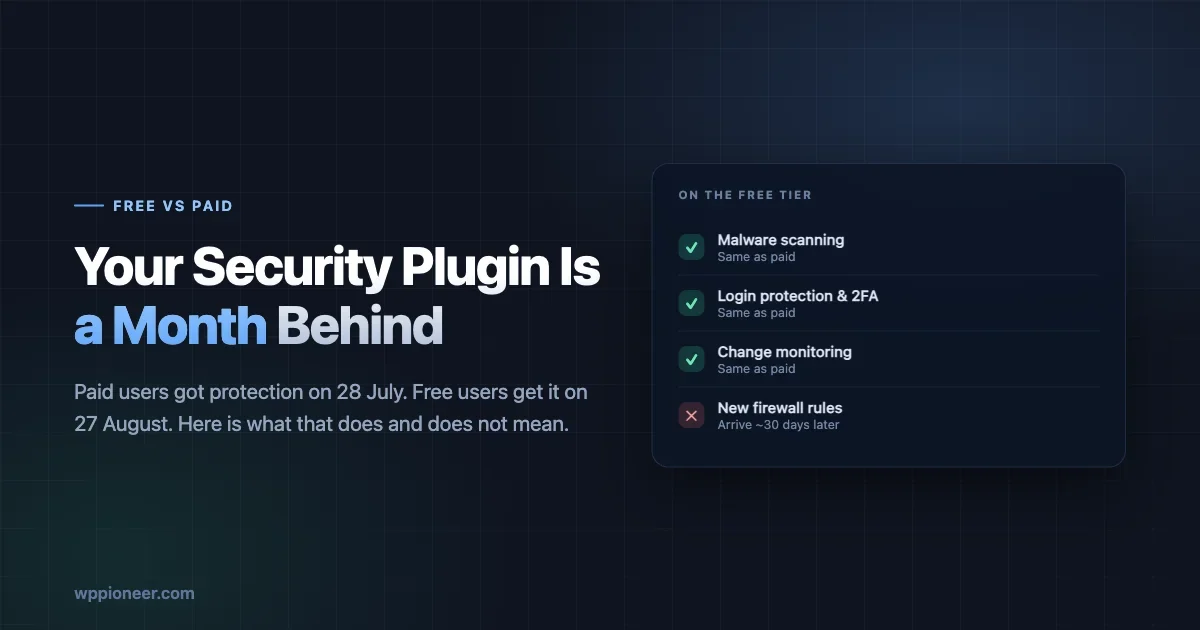
On 28 July, a security company found a serious flaw in a WordPress plugin used on around 20,000 sites. Serious as in: an attacker could take full control of a site without needing a password. They wrote protection against it and sent it to their paying customers that same day.
Their free users get the same protection on 27 August.
That is a month. During that month the flaw is public knowledge, the protection exists, and free users do not have it.
Nobody is being cheated here. This is how the free tier is funded, it is published openly, and the company is not hiding it. But most people running a WordPress site have no idea the delay exists, which means they think they are protected when they are not.
Let us unpack what is actually going on, because once you understand it the right response is fairly simple - and for most small sites it is not “buy the paid version”.
What a security plugin actually does
Security plugins do several different jobs, and they get bundled together under one name, which is where the confusion starts.
Scanning looks at the files on your site and checks whether any of them are known to be malicious. This is like a virus scan on your laptop. It finds problems that already exist.
A firewall sits in front of your site and inspects visitors before they reach it. When someone sends a request that matches a known attack pattern, the firewall blocks it. This prevents problems rather than finding them.
Login protection limits how many times someone can guess a password, and often adds two-factor authentication.
Monitoring tells you when something changes - a new administrator appears, a file is modified, someone logs in from an unusual place.
The delayed part is generally the firewall. Specifically, the individual rules that recognise brand new attacks. Everything else - the scanning, the login limits, the monitoring - works the same on free and paid.
That is worth sitting with for a second. The delayed part is the preventive part. Your plugin will still tell you if something bad has happened. For a month, it is less able to stop it happening.
Here is the same thing as a table, because it is the clearest way to see what you are and are not getting:
What it does | Free tier | Paid tier |
|---|---|---|
Scans files for known malware | Yes, same | Yes |
Limits login attempts | Yes, same | Yes |
Two-factor authentication | Yes, same | Yes |
Alerts you when files or users change | Yes, same | Yes |
Blocks attacks it already knows about | Yes, same | Yes |
Blocks brand new attacks | After ~30 days | Immediately |
Five of six rows are identical. That is the honest picture, and it is a lot better than “the free version does not protect you”, which is what people tend to assume when they first hear about the delay.
Why the delay exists
It is easy to read this as a company holding safety hostage. It is worth understanding why it actually works this way, because the reasoning is reasonable and it tells you when the model is fine and when it is not.
Writing a firewall rule is skilled human work. Somebody has to study the new flaw, work out exactly what a malicious request looks like, and write a rule precise enough to block attacks without blocking your actual visitors. Get it too broad and legitimate people cannot use your contact form. Get it too narrow and attackers walk around it. That happens several times a week, for every new flaw discovered anywhere in the WordPress ecosystem.
Free users pay nothing toward that work. The delay is what turns the research into a product people will pay for, while still eventually protecting everybody. Take away the delay and either the free version disappears or the research does.
There is a second reason too, and it is less obvious. Publishing a rule to millions of free installations immediately tells attackers exactly what is being blocked and how, which helps them design something that gets past it. Giving paying customers protection first, while the attack is fresh, and everyone else later, once the wave has mostly passed, is a defensible trade.
None of that changes your situation. It just means the answer is to plan around it, not to switch plugins in annoyance - the next one works the same way.
Are you affected? Three questions
You do not need the command line for any of this.
1. Which security plugin do you have, and is it the free version?
Go to Plugins in your WordPress admin. Look for anything with “security”, “firewall”, “Wordfence”, “Sucuri”, “Solid” or “Patchstack” in the name. Open its settings and look for the word “Premium”, “Pro” or “Upgrade”. If the plugin is asking you to upgrade, you are on free.
2. Is the firewall actually switched on?
This one catches more people than the free-versus-paid question. Many security plugins install with the firewall in a basic mode, and getting it into full protection mode requires an extra setup step that a lot of people never complete.
In Wordfence, look for “Firewall” then “Protection Level”. You want “Extended Protection”, not “Basic”. If it says Basic, or there is a prompt to optimise the firewall, that step was never finished. Doing it takes about two minutes and does more for you than upgrading would.
Other plugins use different names for the same idea. You are looking for anything that indicates the firewall runs before WordPress rather than inside it.
3. How many plugins do you actually have?
Count the active ones. This is the question that matters most, and I will come back to why.
What actually happens during those thirty days
It helps to picture the sequence, because “you are unprotected for a month” is both true and more dramatic than the reality.
Day 0. Somebody discovers the flaw and reports it privately. Nothing is public. Your site is fine, and so is everyone else’s, because attackers do not know either.
Day 1 to 3. The security company writes a firewall rule and ships it to paying customers. Often the plugin author is working on a fix at the same time. The details are usually still private.
The announcement. The flaw becomes public, typically once a fix exists or once the plugin has been pulled. This is the moment the risk changes, because now attackers know as much as defenders. Automated scanning for vulnerable sites usually begins within hours.
Day 3 to 30. The window. If a fix exists and you install it, you leave the window immediately - this is why updating fast matters more than anything else here. If no fix exists, free-tier users are relying on the flaw not being worth an attacker’s time on their particular site.
Day 30. The free rule ships. Everybody is protected. Attention has usually moved on.
Two things follow from that sequence. The window is only genuinely dangerous when no fix exists, which is the less common case. And the single action that gets you out of it fastest is not a purchase - it is installing the update.
Most of the alarm about this topic skips that middle point. For the large majority of announced flaws, a fix ships alongside the announcement, and a site with auto-updates enabled is protected within hours regardless of tier.
What to do about the gap
Four options, roughly in the order most people should consider them.
Update everything, quickly
This is the big one, and it makes most of the rest irrelevant.
The firewall gap only matters when a flaw has no fix available yet, or when a fix exists and you have not installed it. If you update within a day or two of a fix appearing, you spend almost no time exposed - not because you are protected during the gap, but because you are barely in it.
Turn on automatic updates for plugins if you have not. In WordPress, go to Plugins, and each one has an “Enable auto-updates” link. For most small sites this is straightforwardly a good idea. The classic objection - that an update might break something - is real but much rarer than being compromised because you were three versions behind.
If your site is business-critical and you genuinely cannot auto-update, then check manually every week and treat security releases as urgent.
Delete plugins you do not use
Every active plugin is another thing that can have a flaw. A site with ten plugins has a tenth the exposure of a site with a hundred, and most sites are carrying things nobody has used in years.
Go through your plugin list and ask, for each one: do I know what this does, and would I notice if it were gone? Anything failing both tests is a candidate.
Two important details. Deactivating is not the same as deleting - a deactivated plugin’s files are still on your server. Delete the ones you have decided against. And check your site works after each removal rather than deleting eight at once, so you know which one caused a problem if something breaks.
This single action does more for most sites than any security product decision.
Remove the specific plugin when something is announced
When a flaw is announced and there is no fix yet, the fastest protection is to remove the affected plugin until one arrives.
That feels drastic. It usually is not. In the case that prompted this post, the affected plugin embedded videos. Losing video embeds for a few weeks is a smaller problem than someone taking over the site, and the official advice was to remove it.
The instinct to keep everything working perfectly is what leaves sites exposed. If you can live without a feature for a fortnight, do.
Consider paying, for some sites
Sometimes correct, and worth thinking about properly rather than as a guilt purchase.
If your site takes payments, stores customer details, or losing it for a week would genuinely damage your business, the cost of a premium licence is small against what an incident costs. Buy it.
If your site is a blog, a brochure site or a portfolio, the honest answer is that fast updates and fewer plugins protect you more than a licence does, and you should spend the effort there instead.
The wrong reason to buy is anxiety. The right reason is that you have thought about what the site is worth and decided the faster protection is proportionate.
The thing that matters more than any of this
Here is the part that reframes the whole question.
The firewall gap only threatens you if you are running the plugin that has the flaw. Someone with twelve plugins is exposed to flaws in twelve plugins. Someone with forty-five is exposed to nearly four times as many, and at any given moment the odds that one of them has an unpatched problem stop being theoretical.
No security product fixes that. The firewall rule turns up exactly on schedule and protects you against an attack on something you did not need installed.
This is why I would rather you spent twenty minutes deleting unused plugins than an hour comparing security plugin pricing. The first genuinely reduces your risk. The second mostly moves it around.
Our guide on what a WordPress plugin can actually do to your site covers why this matters so much - an active plugin has the same access as WordPress itself, so every one you install is a decision to trust somebody.
“But my host says they handle security”
Worth addressing, because a lot of people read all this and conclude it does not apply to them.
Managed WordPress hosts often do provide a firewall at the server level, and some apply their own protections to known flaws faster than a free plugin rule arrives. If you are on a good managed host, you may genuinely be covered during the window.
The problem is that “we handle security” appears on almost every hosting page, including from hosts doing very little. It is a marketing phrase before it is a technical claim.
Three questions get you a real answer, and support will tell you if you ask directly:
Do you run a web application firewall in front of my site, or is it just the plugin I installed? Different things. If they say the former, ask what happens when a new WordPress plugin flaw is announced.
How quickly do you add protection for newly announced WordPress vulnerabilities? A good host has an answer. A vague one is itself informative.
Do you patch plugin vulnerabilities on my behalf, or is that mine to do? Some managed hosts apply fixes automatically. Most do not touch your plugins at all.
If the answers are good, you have less to worry about than this post suggests. If they are vague, assume you are on your own and go back to the checklist below. Either way you now know, which is better than assuming.
One thing no host covers: a flaw in a plugin you chose to install, in code they did not write, on a site they do not audit. Removing plugins you do not need remains yours regardless of who you host with.
A short, honest checklist
Not comprehensive. These are the things that actually move the needle for a normal site.
- Turn on automatic plugin updates. Ten minutes, biggest single improvement.
- Delete plugins you do not use. Delete, not deactivate.
- Check your firewall is in full protection mode, not basic. Two minutes.
- Use a strong, unique password on your admin account, and turn on two-factor authentication. Most break-ins are still stolen passwords, not clever exploits.
- Know who has an administrator account. Go to Users, filter by Administrator, and remove anyone who should not be there - the freelancer from 2023, the old agency, the account somebody made for testing.
- Have a backup you have actually restored once. A backup you have never tested is a hope.
None of that requires a paid plugin. All of it matters more than which tier you are on.
How to find out when something is announced
There is an obvious gap in everything above: all of it assumes you hear about a flaw in the first place. Most site owners find out weeks later, or never.
You do not need to follow security news daily. Two low-effort habits cover it.
Let your security plugin email you. Every one of them can send a notification when a plugin you have installed is found to be vulnerable. It is usually on by default and usually going to an address nobody reads. Check where those emails land, and make sure it is somewhere you will see them. This is the single highest-value setting in the entire plugin, and it works identically on free and paid.
Skim one weekly roundup. Several security companies publish a weekly summary of newly discovered WordPress vulnerabilities. Reading the headlines takes two minutes, and you only need to act when a plugin you actually run appears. Subscribing to one is enough - they largely cover the same ground.
What you do not need is a daily feed of security news. The realistic goal is not to know about every flaw in the ecosystem. It is to hear about the handful that affect the specific plugins on your specific site, within a few days rather than a few months.
If you do get one of those emails, the response is the checklist below: is there an update, install it. Is there no update, can I remove the plugin for now. That is the whole decision, and it takes five minutes.
What I am not saying
I am not saying security plugins are pointless, or that free tiers are a con. A free security plugin with the firewall properly enabled is meaningfully better than nothing, and the scanning and login protection work exactly the same as the paid version.
I am also not saying you should panic about the month-long gap. For most small sites, the realistic risk during that window is low - attackers go after the biggest available target populations, and the fix usually arrives long before the firewall rule does.
What I am saying is narrower. There is a gap between what “I have a security plugin installed” sounds like it means and what it delivers on the day a serious flaw is announced. Knowing the gap exists lets you make a decision about it. Not knowing means the decision gets made for you, by default, every time.
If you want to know whether your site has already been compromised, that is a different question with its own answers, and it is worth ten minutes regardless of which plugin you run. And if you are still choosing a plugin, our comparison of Wordfence, Sucuri and Solid Security covers what each one does well - just read it knowing that the tier question matters as much as the brand.
How much should you actually worry?
Different sites carry different risk, and blanket advice serves nobody. Roughly where most people land:
Your site | How much the gap matters | What to do |
|---|---|---|
Blog, portfolio, brochure site | Low | Auto-updates, fewer plugins. Free tier is fine. |
Small business site with a contact form | Low to moderate | Same, plus check the firewall is in full mode. |
Membership site or online course | Moderate | Same, plus tighten who has admin access. |
Shop taking payments | High | Consider the paid tier. Removing an affected plugin is not optional. |
Site storing sensitive personal data | High | Paid tier, plus a documented plan for announcements. |
The pattern is not really about site size. It is about what an attacker gets if they succeed. A busy blog with no logins and no customer data is annoying to have hacked; a shop with saved card details is a different category of problem, and the money you spend on protection should reflect that rather than your traffic numbers.
Two things worth adding for the higher rows. Sites handling payments usually have obligations beyond good practice - if you take cards, your payment provider likely has security requirements written into your agreement, and “we were on the free tier” is not a defence. And any site storing personal data in the EU or UK carries reporting duties if it is breached, which makes the cost of an incident much larger than the cost of cleaning it up.
If you are in the bottom two rows and reading this on a free tier, that is worth ten minutes today.
The short version
Your free security plugin gets protection against brand new attacks about a month after paying customers do. That is normal, it is published, and it is not a scandal.
It matters less than you might think, because updating quickly and running fewer plugins protects you more than the tier does.
And it matters more than most people realise, because almost nobody knows the window exists, which means almost nobody decides what to do about it.
Spend the twenty minutes on your plugin list. That is the version of this advice that will actually make your site safer.
No comments yet