
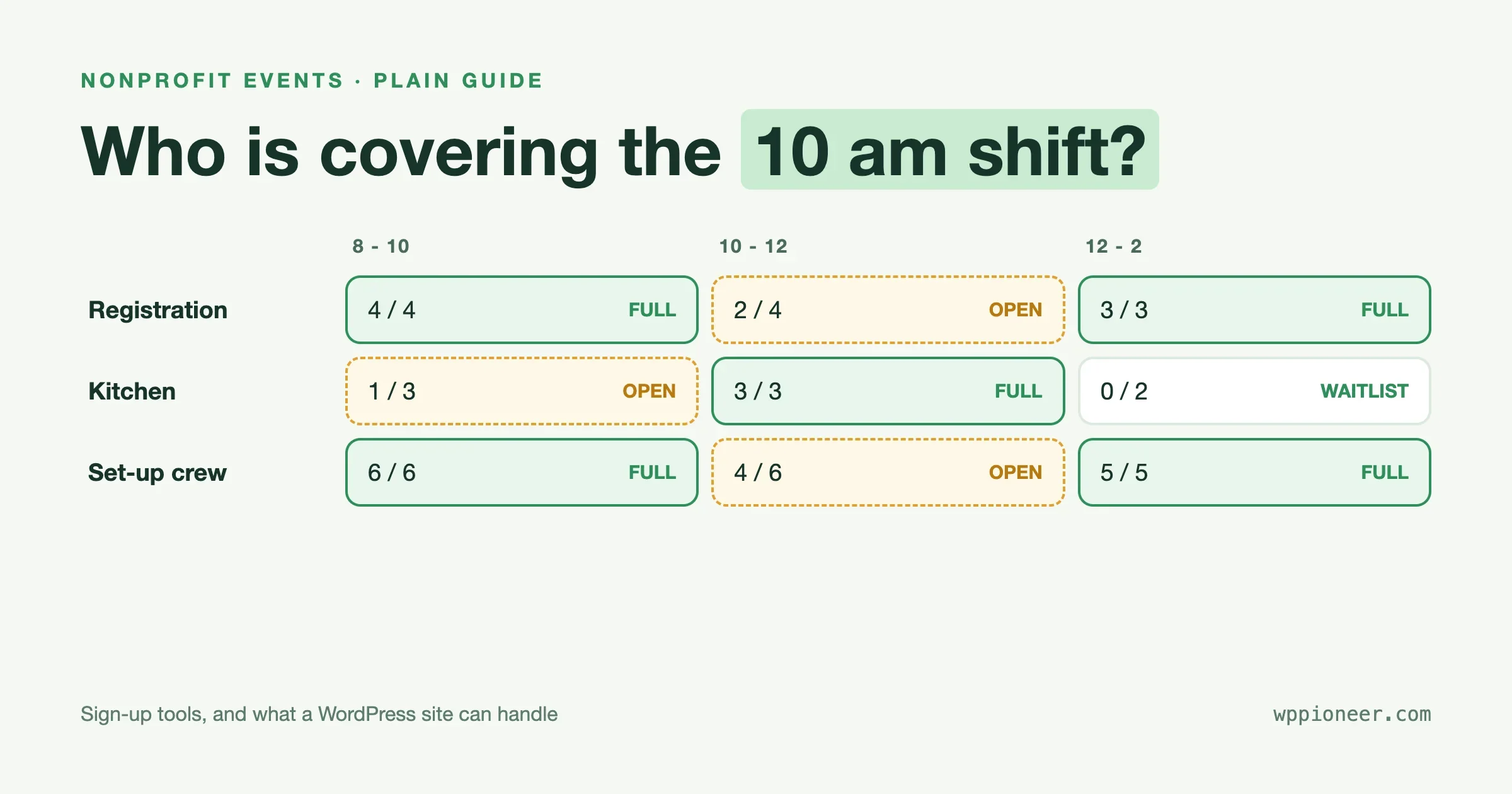
For a one-off event with a handful of helpers, a free hosted sign-up sheet is the quickest way to fill volunteer shifts. For a charity that runs volunteers every week and needs hours, rosters and records, a dedicated volunteer platform earns its keep. A WordPress site can handle the middle ground well: sign-ups with a cap per job, a waitlist, reminders and a spreadsheet export. It cannot run a rota, track hours, or stop two people booking the same slot unless you build that in. The rest of this guide helps you decide which of those three you actually need, using plain checks you can run in an afternoon.
Disclosure first. Eventonomy, one of the WordPress options we describe, is made by Wbcom Designs, and we have a link to its makers, so weigh our notes on it accordingly. We describe it with its limits, taken from its own site and documentation, read on 3 November 2026. We say nothing about competitor prices here, because they change often and you should read them on the vendor’s page before you decide.
What does a volunteer shift sign-up tool actually have to do?
Before you compare names, write down the job. Most volunteer coordinators need the same eight things, and any tool that misses two or three of them will cost you more time than it saves.
- Slots with a limit. “Registration desk, 9 to 11, four people” must stop at four. Without a cap, you find out you are short, or over, on the morning itself.
- Sign-up without a password. Volunteers do not want another account. A name and an email should be enough.
- Reminders that send themselves. The single biggest cause of empty shifts is people forgetting. A reminder a day before and a few hours before fixes most of it.
- A waitlist or a way to swap. People cancel. Someone should be able to take the open spot without you doing the emailing.
- One list you can export. A spreadsheet with names, jobs, phone numbers, t-shirt sizes and dietary needs, so the kitchen lead and the driver get what they need.
- A way to contact everyone. A meeting point changes. You need to message every confirmed volunteer in one go.
- Works on a phone. Most volunteers will sign up from a message on their phone.
- You keep the list. If you stop using the tool, can you take your volunteers with you?
Two more matter only to bigger programs: tracking hours (for volunteer recognition, school service credits or grant reports) and a database of volunteers across many events. If you need those, skip ahead to the platform section. If you do not, most of the cost and complexity of dedicated software is not for you.
Which type of tool fits which kind of group?
What you run | Best fit | Why |
|---|---|---|
A bake sale, a school fair, a one-day clean-up | Hosted sign-up sheet | Set up in minutes, no website needed |
A weekly food bank or a church rota | Sign-up sheet plugin or events plugin on your own site | Repeating events, your own branding, no extra login to explain |
A race, festival or conference with hundreds of volunteers | Dedicated volunteer platform | Shift grids, roles, check-in and hours tracking |
A volunteer community with recognition and chat | Community site plus an events tool | Sign-ups are one part of a bigger picture |
A very small group with no budget | A shared spreadsheet and a form | Fine for under about fifteen people, then it creaks |
Notice that “WordPress” is an answer to only some rows. A common mistake is choosing a plugin because you already own a website, when what you need is a rota with hours. A plugin you have to bend into shape costs more than a tool built for the job.
What are the main volunteer sign-up options?
SignUpGenius (hosted sign-up sheets)
SignUpGenius describes itself on its home page as a group organizing tool, with sign-up sheets, event tickets, dues, fundraisers, waivers and online stores in one account. It says you can create a sign-up, share one link, and let automatic reminders handle follow-up, and that no account is required for participants. It also claims more than 70 million people use it. Those are the vendor’s own figures.
The trade-off with any hosted sheet is that the list of volunteers lives on someone else’s platform, and the more you add (payments, waivers), the more you depend on it. For a school fair, that is a fair price for saved time. Check the current free and paid limits on its pricing page before you commit, because they decide whether it fits a bigger group.
VolunteerLocal (dedicated volunteer management)
VolunteerLocal’s home page describes a platform for managing volunteers, with a volunteer database, volunteer communication tools, scheduling and tracking and reporting. It separates two uses: programs with ongoing needs, where it says it organizes daily, weekly and monthly shifts, and one-off events such as races and fundraisers. It says volunteers do not need a password.
This is the category to look at when you need hours, a record of who did what across a year, or many roles with their own head counts. It is more than a small charity needs for a single clean-up day, and it is a platform you pay to use, so read its pricing page for current plans.
Sign-up Sheets (a WordPress plugin)
Sign-up Sheets is a plugin listed on WordPress.org that runs sign-ups inside your own site. Its listing says the free version lets you create unlimited sheets and spots, copy a sheet or task, send confirmation emails, show logged-in users all their sign-ups on one page, add optional reCAPTCHA, export sign-up data to CSV and support WordPress privacy features. It says it is built with accessibility in mind and that its Pro version adds custom fields, reminder emails, per-sheet email customization, categories, editing of your own sign-ups and a feature that holds a spot for three minutes while someone completes the form.
Read that list the way a beginner should: reminders and custom fields are Pro features in its own description. The listing describes the plugin as a practical alternative to monthly paid services, with sign-ups kept on your own site. Check its current pricing before you decide whether the Pro features you need are worth it.
Eventonomy (an events plugin that can collect sign-ups)
Eventonomy is an events plugin, not a volunteer scheduler, and its own documentation is plain about that: there is no shift grid, no hours tracking and no rota. What it offers instead are parts you can combine for a volunteer day, and they are enough for many small groups.
- RSVP with a role question. Set the event capacity to your total number of volunteers, leave the waitlist on, and add a dropdown question called Role. The limit, per its documentation, is that capacity covers the whole event, not each role.
- One free ticket type per role. If a job has a fixed number of places, give each role its own free ticket with a quantity. Each role then sells out on its own. The documentation says that once an event has tickets, the waitlist no longer promotes people automatically: everyone waiting is emailed and the first to complete the sign-up gets the seat.
- Shifts as separate events. For a morning and afternoon crew, create two ticket types or duplicate the event once per shift. Each crew has its own list.
The free plugin includes unlimited events and RSVPs, guest sign-up with a name and email and a magic link to change the answer later, custom questions, waitlists, recurring events, reminders a day and an hour before, branded emails and a CSV export of attendees and their answers. Check-in with QR codes is a Pro feature. Per its site, it needs WordPress 6.5 or newer and PHP 8.1 or newer. It does not issue tax-deductible receipts, and it does not run auctions or text-to-give.
A shared spreadsheet and a form
For a very small group, a spreadsheet with a form can do the job, and it costs nothing to try. It has no caps, so two people can pick the same slot. It sends no reminders unless you set them up yourself. And it is easy to lose track of who has seen the latest version. Treat it as a starter, not a system.
What can a WordPress site handle, and where does it stop?
If you already have a WordPress site for your charity, church or club, adding a sign-up plugin can be the lowest-friction choice. Volunteers land on a page they already know, under your name, and the list sits in your own database. Here is an honest split of what that does and does not cover.
Need | A WordPress plugin can do it? | Notes |
|---|---|---|
Sign-up with a cap | Yes | Per event, or per role through ticket types |
Sign-up without an account | Yes | Name and email with a magic link, in the events plugin we describe |
Reminders | Yes, with limits | Built in for some, a paid feature in others |
Waitlist | Yes | Automatic promotion works on free RSVPs, not on events with tickets |
Export to CSV | Yes | Names, answers, roles |
Weekly repeating shifts | Yes | A sign-up covers the series, so give a week its own event if it needs its own cap |
A rota grid showing who is where, hour by hour | No, not in the tools we looked at | Use the export and a spreadsheet |
Hours tracking for recognition or credits | No | A volunteer platform does this |
Preventing double booking across overlapping shifts | No | You check the export |
Check-in on the day | Pro, in the events plugin we describe | Or a printed list |
Two things to remember. First, running it yourself means you update it, back it up and keep it secure. For a charity with no technical person, that is a real cost. Second, if you do have a site, a plugin takes a morning to set up and costs nothing in monthly fees, which matters when the board wants every pound or dollar to go to the mission.
How do I set up a volunteer day on WordPress, step by step?
This walkthrough uses an events plugin with RSVP and capacity, following the pattern in Eventonomy’s documentation. The same logic applies to any plugin that has caps and custom questions.
- Install the plugin and open its events screen. Use a staging copy first if you have one.
- Save the meeting point as a venue, with directions in the description. Volunteers get lost on the way to car parks more than anywhere else.
- Create the event. Write the date, the start time and what to bring in the first two lines. Set the capacity to the number of volunteers you can supervise.
- Turn on the waitlist. When someone cancels, the next person moves up.
- Add questions. A role dropdown, a phone number, a t-shirt size, anything dietary. Ask only what you will use. Every extra question loses a few volunteers.
- Choose how sign-up works. For one-off volunteers, no account is usually the least friction.
- Close sign-ups a day or two before the event, while you can still plan.
- Publish and share the link in your newsletter, on your noticeboard page and in your group chat.
- A week out, export the list. Count roles and sizes. If twenty people picked the registration desk and you wanted four, phone some and move them.
- The day before, let the reminder go out. Add late arrivals by hand on the day so your list is complete.
If a job needs a firm number of places, use one free ticket type per role instead of the dropdown, and test the whole flow yourself before you share the link. Sign up as a volunteer on your phone. Check the confirmation email. Check what happens when a role is full.
How should I handle volunteers’ personal details?
Volunteer lists hold names, phone numbers and sometimes health or access information. A few habits go a long way, and none of them needs a lawyer.
- Collect the minimum. If you do not need a date of birth, do not ask for it.
- Say why you ask. A line on the form such as “We use your phone number only to contact you about this event” builds trust.
- Delete when done. Keep the list as long as you need it, then remove it. Decide that date before you collect anything.
- Limit who can see it. On WordPress, give the coordinator the lowest role that works rather than an administrator account.
- Take extra care with under-18s. Rules vary by country and by the kind of organization. Check your local requirements and your insurer’s.
Our site is not a legal adviser, and we cannot tell you what your country requires. If your group works with children or vulnerable adults, ask your insurer and your national volunteering body what checks and records they expect.
What goes wrong with volunteer sign-ups, and how do I prevent it?
The same five problems turn up again and again.
Problem | What it looks like | Fix |
|---|---|---|
Everyone picks the easy job | Twenty at the registration desk, none in the kitchen | Cap each role, or call and move people a week out |
No-shows | Ten sign up, six come | Reminders a day and an hour before, and an easy way to cancel |
Nobody knows where to go | People arrive at the wrong gate | Venue, directions and a named contact in every confirmation |
The list is in three places | An email thread, a sheet and a chat | One sign-up link and one exported list |
The coordinator is the only person who knows | The plan lives in one head | Give a second person the same access |
Beyond tools, treat volunteers’ time as the scarce thing it is. Say how long the shift is, whether food is provided and what they will do. A clear description fills more shifts than any feature.
When is a community site the better answer?
Sometimes the real problem is not sign-ups, it is keeping volunteers engaged between events. Recognition, a place to chat, a record of who helped and thanks that feel personal all count. We cover a worked example of that in the BuddyX site’s guide to building a nonprofit volunteer community with BuddyNext, Eventonomy and WB Gamification, which shows how shifts and recognition can sit together. If you are weighing how heavy a community platform should be, read what breaks at month seven before you build.
What should I ask a vendor before I commit a whole season of volunteers?
A trial that works for ten test sign-ups can fail at three hundred real ones. Before you move a program onto any tool, ask these questions and write down the answers.
- What happens to my list if I leave? Can you export every volunteer, every answer and every sign-up date, in a file you can open? Try the export during the trial, not after.
- What are the limits on the plan I will use? Free tiers often cap events, emails or sign-ups. Find the number that would stop you.
- Who gets the volunteer’s email address? Some platforms use it for their own marketing. Read the privacy page for the sentence about it.
- What does a volunteer see? Sign up as one, on a phone, on a slow connection. If you struggle, they will too.
- What does a cancellation do? Cancel a spot and watch what happens to the waitlist, the count and your inbox.
- Who helps when it breaks? On a hosted tool, that is a support team. On your own site, it is you or someone you pay. Know the answer before the event, not during it.
- Is it accessible? Try the form with only a keyboard. Volunteers include people who cannot use a mouse, and a form they cannot finish costs you a pair of hands.
Keep a one-page note of the answers, with the date. When the vendor changes a plan next year, you will know what you agreed to and what changed.
How do I choose, in plain terms?
- Count your volunteers and events. Under thirty volunteers and a few events a year: a hosted sheet or a plugin.
- Ask whether you need hours or rotas. If yes, look at a dedicated platform and ignore the rest.
- Ask who will look after a website. If nobody can, use a hosted tool. If someone can, a plugin on your own site keeps your data with you.
- Test with a real, small event. Run one real shift list for a low-stakes occasion and see what goes wrong.
- Read the vendor’s pricing page on the day. Fees, limits and free tiers change. A plugin is also a purchase: our checklist for buying plugins and what to check first covers renewals, licences and refund terms.
Frequently asked questions
What is the best free volunteer sign-up tool?
It depends on the size of your group. A hosted sign-up sheet is the quickest for one event. A WordPress plugin on a site you already have costs nothing in monthly fees. A shared spreadsheet works for very small groups. Check each tool’s free tier, because limits differ.
Can WordPress handle volunteer shift scheduling?
For sign-ups with caps, reminders and exports, yes. For a rota grid, hours tracking or clash detection, the plugins we looked at do not, and a dedicated volunteer platform is a better fit.
Do volunteers need to create an account?
They should not have to. Name and email is enough for most events. Look for tools that offer a magic link or reminder email so people can change their answer without a password.
How do I stop people signing up for the same slot?
Use a tool with a cap per slot. In an events plugin, that usually means one event or one ticket type per shift or role, each with its own quantity.
How many reminders should I send?
One a day before and one a few hours before covers most events. Some tools send these for you. Others include reminders only in a paid tier, so check before you rely on them.
Can I track volunteer hours with a plugin?
Not with the sign-up plugins described here. If you need hours for recognition, school credits or grant reports, use a volunteer management platform, or export attendance and total the hours in a spreadsheet for a small program.
Is it safe to keep volunteer details on my own website?
It can be, if you keep WordPress updated, back up the site, limit who can see the list and delete data you no longer need. If nobody on your team can look after that, a hosted tool moves the work to the vendor.
The short version
Match the tool to the job. A hosted sign-up sheet suits a single event. A dedicated platform suits a big or ongoing program that needs hours and rotas. A WordPress plugin suits a group that already has a site and wants sign-ups with caps, a waitlist, reminders and an export, with no monthly fee, and it will not run a rota for you. Write down your eight needs, test a small real event, and read each vendor’s own pricing page on the day you choose. Sources: vendor pages for SignUpGenius and VolunteerLocal, the Sign-up Sheets listing on WordPress.org, and eventonomy.org with its nonprofit page and documentation, read on 3 November 2026.
No comments yet