
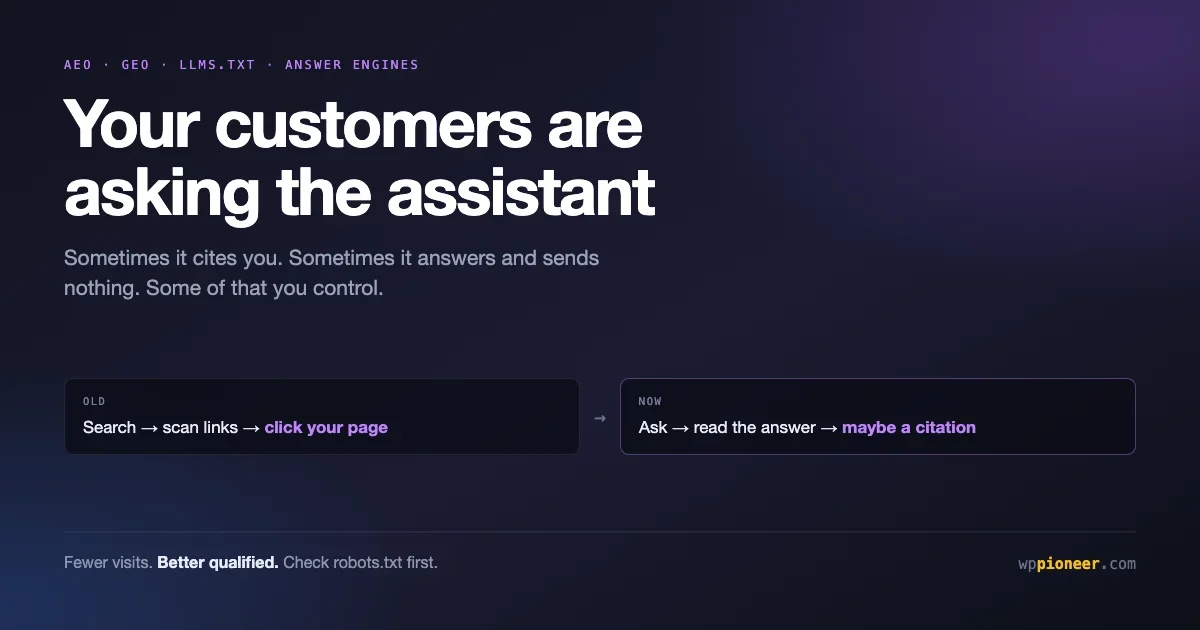
Something changed in how people find websites, and most site owners are hearing about it as a stream of acronyms: AEO, GEO, llms.txt, answer engines. The acronyms are mostly marketing. The underlying shift is real and worth ten minutes of your attention.
The short version: a growing share of people now ask an AI assistant a question instead of searching and clicking. Sometimes those assistants cite sources and send traffic. Sometimes they answer and send nothing. Which of those happens to your site depends partly on things you control.
This article covers what is actually happening, what the numbers do and do not say, the handful of changes genuinely worth making, and which of the current advice is people selling you something.
What is actually happening
Search used to be one behaviour: type words, get links, click one. Now there are three, and they overlap.
Behaviour | What the visitor does | What you get |
|---|---|---|
Traditional search | Searches, scans results, clicks through | A visit, as always |
AI summary in search | Reads the answer at the top, may not click | Possibly a citation, often no visit |
Asking an assistant | Asks ChatGPT, Perplexity, Claude or Copilot directly | A citation and a visit, or nothing |
The projection getting quoted most is from EMARKETER: roughly 31 percent of Americans using generative AI search during 2026. Treat that as an indication of direction rather than a precise figure, because these numbers are estimates and definitions vary between studies.
The more useful number, if you sell things, is that traffic arriving from AI assistants tends to convert better than traffic from ordinary search. That makes intuitive sense. Someone who has already had a conversation about their problem and arrives at your page on a recommendation is further along than someone who clicked the fourth blue link.
Fewer visitors, better qualified. That is the trade, and whether it favours you depends on what your site is for.
Which means the honest framing is not “AI is destroying your traffic”. It is that visits and answers are separating. Some of what used to be a visit is now an answer somewhere else, and your name may or may not be attached to it.
Where AI traffic actually comes from
Understanding the routes helps you stop treating this as one thing, because the four main ones behave differently and only some of them are worth effort.
AI summaries inside search results. Google and Bing generate an answer above the ordinary results. This is the highest volume route by a wide margin, and the one where you are most likely to be summarised without a click. It is also the one you influence through ordinary search visibility: appearing in the summary generally requires ranking well in the first place.
Direct questions to an assistant. Someone opens ChatGPT or Claude and asks. The assistant may search the web, may answer from what it already knows, and may cite sources. Lower volume, much higher intent, and the route where being clearly quotable matters most.
AI-first search products. Perplexity and similar tools are built around cited answers, so they link out more consistently than a general assistant. If you see meaningful AI referral traffic today, a large share is probably from these.
Assistants embedded in other software. Increasingly your customers meet AI inside a browser, an email client or a work tool rather than at a dedicated site. This is the fastest changing category and the least worth optimising for specifically, because the behaviour differs per product and shifts constantly.
The practical consequence: the first route is mostly won through ordinary SEO, and the second and third are won by being clear and quotable. Those are the same two jobs described above, which is why the acronym-heavy advice tends to collapse into ordinary good practice once you strip the branding.
The content that survives this well
Worth being blunt about which pages are exposed and which are not, because it determines how much of this should worry you.
Most exposed: short factual answers. Opening hours, definitions, conversions, simple how-tos, basic comparisons. If your traffic comes from people asking what something means, expect that to decline, because that is exactly what an assistant answers without a click.
Partly exposed: roundups and listicles. An assistant can summarise ten options as easily as you can list them. What it cannot do is have actually used them, which is why first-hand testing and specific detail is what keeps this content alive.
Barely exposed: anything requiring trust, judgement, locality or a transaction. Choosing a supplier, booking a service, reading a real case study, buying something. An assistant may well recommend you for these, which means a citation here is worth more than the ten visits it replaced.
Not exposed at all: your own customers looking for you by name, arriving from email, social or a bookmark. This is often a larger share of traffic than owners realise, and it is untouched by any of this.
If you want a quick read on your own exposure, look at your top landing pages and sort them into those four buckets. A site whose top pages are all in the first bucket has real work ahead. A site whose top pages are services and contact has very little to worry about.
Check your position before changing anything
Before acting on any of this, find out whether it affects you. Three checks, none of which need a developer.
Are you already being cited?
Ask the assistants directly. Open ChatGPT, Perplexity or Claude and ask the questions a potential customer would ask, in the way they would ask them. Not “what is your business name“, which proves nothing, but the actual question your best page answers.
See whether you appear, whether a competitor appears, and what the answer gets wrong. That last part is the valuable one. If an assistant is confidently describing your pricing incorrectly, that is a concrete problem with a concrete fix.
Is any AI traffic reaching you already?
In your analytics, look at referral sources for domains like chatgpt.com, perplexity.ai and claude.ai. Most sites see a small number. A few see a surprising number.
Whatever you find is your baseline. Without it, you have no way to tell whether anything you do next helps.
Are you accidentally blocking them?
This is the one that actually catches people out. Visit yourdomain.com/robots.txt in a browser and read it.
You are looking for rules that block AI crawlers by name, typically GPTBot, ClaudeBot, PerplexityBot or Google-Extended. Some security plugins and hosting providers added these blocks during the period when blocking AI crawlers was fashionable, often without telling anyone.
If your file contains something like this, and you want AI citations, that is your first problem:
User-agent: GPTBot
Disallow: /

User-agent: ClaudeBot
Disallow: /
Blocking those crawlers is a legitimate choice, and some publishers make it deliberately because they do not want their work training models. What is not sensible is blocking them by accident and then wondering why you are never cited.
What actually helps
Now the useful part. In rough order of how much difference it makes.
Make sure your content is readable without JavaScript
This is the least glamorous item and the most important one.
Crawlers, including AI crawlers, are far better at reading content that exists in the page when it arrives than content assembled afterwards by scripts. If your key information appears only after JavaScript runs, you are gambling.
Standard WordPress with a normal theme already does the right thing here. The risk arrives with page builders configured to load content dynamically, or heavy use of lazy-loading for text rather than images.
Check it by viewing the page source in your browser, which shows what arrives before scripts run, and searching for a distinctive sentence from your page. If it is not there, that is worth fixing regardless of AI.
Answer questions directly, near the top
Content that gets quoted has a particular shape: a clear question, followed immediately by a direct answer, followed by supporting detail.
The pattern that does not get quoted is the traditional article that opens with three paragraphs of throat-clearing before reaching the point. An assistant extracting an answer looks for a self-contained passage that answers the question. Give it one.
Practically, for each important page: state the answer in the first two sentences, then explain. Use headings that are the actual questions people ask. Keep each answer complete enough to stand alone if lifted out of context.
This is also better for human readers, which is the tell that it is real advice rather than a trick.
Be specific and verifiable
Assistants and search engines both favour content that commits to specifics. Prices, dates, version numbers, measurements, named products.
Vague content is hard to cite because there is nothing to quote. “Our service is affordable and fast” gives an assistant nothing. “Setup takes two working days and costs 400 pounds” is quotable, checkable and useful.
The corollary is that specifics go stale, so anything with a number in it needs a review schedule. A cited page with wrong prices is worse than not being cited.
Keep your factual pages current
If an assistant has learned something incorrect about your business, the fix is to publish the correct version clearly, in the obvious place, and keep it there. Your about page, pricing page and contact details should be unambiguous and consistent across your site.
Inconsistency is a real cause of wrong answers. If three pages give three different phone numbers, something has to pick one.
The llms.txt question
You will have seen advice to add an llms.txt file to your site. It deserves a straight answer, because the advice is usually given with more confidence than the situation supports.
What it is: a proposed text file at the root of your site, similar in spirit to robots.txt, that offers AI systems a clean summary and map of your content in plain markdown.
The honest status: it is a community proposal that has attracted real interest. It is not an official standard agreed by the major AI companies, and there is no public confirmation from them that its presence influences whether you get cited.
So should you add one? A reasonable position:
- If it costs you an hour, the downside is an unused file and the upside is being early if adoption grows. That is a fine bet.
- If someone wants to charge you a monthly fee to manage it, decline. It is a text file.
- If it is being sold to you as the reason your traffic will recover, be sceptical. Nothing supports that claim today.
- If you are choosing between llms.txt and making your content readable without JavaScript, do the second one first. It matters more and it is definitely real.
A minimal version looks like this, saved as llms.txt at your site root:
# Your Business Name

> One sentence describing what you do and who for.

## Key pages

- [What we do](https://example.com/services): one line summary
- [Pricing](https://example.com/pricing): current prices and what is included
- [Contact](https://example.com/contact): how to reach us

## Notes

Prices last reviewed July 2026.
Several WordPress SEO plugins now generate this automatically, which is the easiest route if yours offers it.
What is not worth your time
Some of the current advice is recycled from older SEO fashions and does not deserve your attention.
Stuffing your pages with question-shaped headings you do not answer. This is keyword stuffing with a new coat of paint. It was transparent to search engines and it is transparent to language models.
Paying for “GEO optimisation” as a separate service. Almost everything that helps here is ordinary good practice: clear writing, direct answers, accurate facts, technically sound pages. If someone is selling GEO as a distinct discipline with a distinct invoice, ask exactly what they will do that a competent content person would not.
Rewriting your whole site for AI. The overlap between what helps AI citation and what helps human readers is very large. Sites that read well and load properly tend to do fine.
Obsessing over being cited by one particular assistant. The landscape is unstable. Products launch, change and shut down, as ChatGPT Atlas did this year. Optimising for one product’s current behaviour is building on sand.
Measuring whether any of it worked
Set a reminder for three months from now and check three things.
- Referral traffic from assistant domains. Compare against the baseline you noted earlier.
- Whether the answers changed. Ask the same questions you asked at the start and see whether you appear, and whether the errors got fixed.
- Whether your overall traffic mix shifted. If search visits fell while conversions held steady, that is the fewer-but-better-qualified pattern rather than a problem.
That third one matters because it changes how you should read a traffic decline. A drop in sessions with steady enquiries is a different story from a drop in both, and reacting to the first as though it were the second leads to bad decisions.
Questions people are asking
Will AI search kill my traffic?
It will probably reduce visits for questions that have short factual answers, because those get answered directly. Content that requires depth, judgement, local knowledge or a transaction still needs a visit. If your traffic depends heavily on quick factual queries, this affects you more than most.
Should I block AI crawlers?
A real choice with a real trade-off. Blocking means your content is less likely to train models and less likely to be cited. If your business depends on being found, blocking is usually the wrong call. If you are a publisher whose work is the product, the calculation is different. What you should not do is block by accident.
Do I need a plugin for this?
Mostly no. The exception is llms.txt generation, where a plugin that already does it saves you maintaining the file by hand. Everything else is writing and technical hygiene. Our roundup of the plugins beginners actually need covers what is worth installing.
Does schema markup help?
It helps search engines understand your pages, and most WordPress SEO plugins add it automatically, so you probably already have it. Whether it influences AI citation specifically is not clearly established. Since you get it for free with a decent SEO plugin, this is not a decision requiring much thought.
How is this different from normal SEO?
Less than the marketing suggests. Clear structure, direct answers, accurate facts and technically sound pages have been good practice for years. What genuinely changed is that being the source of an answer now has value even when it does not produce a click, and that some of your audience will never see your page at all.
Should I worry that assistants are using my content without paying me?
It is a fair objection and worth separating from the practical question. Whether AI companies should compensate publishers is a live legal and political argument that individual site owners are not going to settle. What you can decide is whether you participate. Blocking the crawlers is the lever available to you, and it is a real one with a real cost: no crawl, no citation, no referral. Publishers whose work is the product increasingly decide the trade is not worth it. Businesses using content to be found usually decide it is. Neither answer is naive.
How often should I re-check any of this?
Quarterly is plenty for most sites. The landscape moves fast in the news and slowly in ways that affect a small business site. Checking monthly mostly produces noise and the temptation to react to it. The exception is if you make a substantial change to your most important pages, in which case checking a few weeks later tells you whether it landed.
Does any of this affect my Google rankings?
Everything recommended here is neutral or positive for ordinary search. Clear structure, direct answers, factual accuracy and content that loads without JavaScript are all things search engines have rewarded for years. There is no trade-off to manage, which is another sign that the underlying advice is sound rather than faddish.
My content management is basic. Where do I start?
Check robots.txt for accidental blocks, then rewrite the opening of your three most important pages so each answers its question in the first two sentences. That is an afternoon and it covers most of the available benefit. Our guide to topic clusters and internal linking covers the structural side once you have done that.
Your checklist
- Ask three assistants the questions your customers ask, and note what they say about you.
- Check analytics for referrals from assistant domains and write down the baseline.
- Read your robots.txt and remove accidental AI crawler blocks.
- View source on a key page and confirm your content is there before JavaScript runs.
- Rewrite the opening of your three most important pages to answer directly.
- Replace vague claims with specific, checkable facts.
- Add an llms.txt if it takes an hour, and skip it if someone wants a retainer for it.
- Set a reminder to re-check in three months.
One caveat on all of it. This area attracts confident predictions, and most of them will be wrong, because the products change every few months and the data available to anyone outside the AI companies is thin. Treat anything you read on this subject, including this article, as a description of how things look in mid 2026 rather than a settled account. The parts most likely to still be true in two years are the unglamorous ones: content that loads properly, answers stated plainly, facts that are actually correct.
The reason to do this now rather than later is not that traffic is about to collapse. It is that the questions people ask assistants about your industry are being answered right now, with or without you, and the sites that show up in those answers are the ones that made themselves easy to quote.
No comments yet