
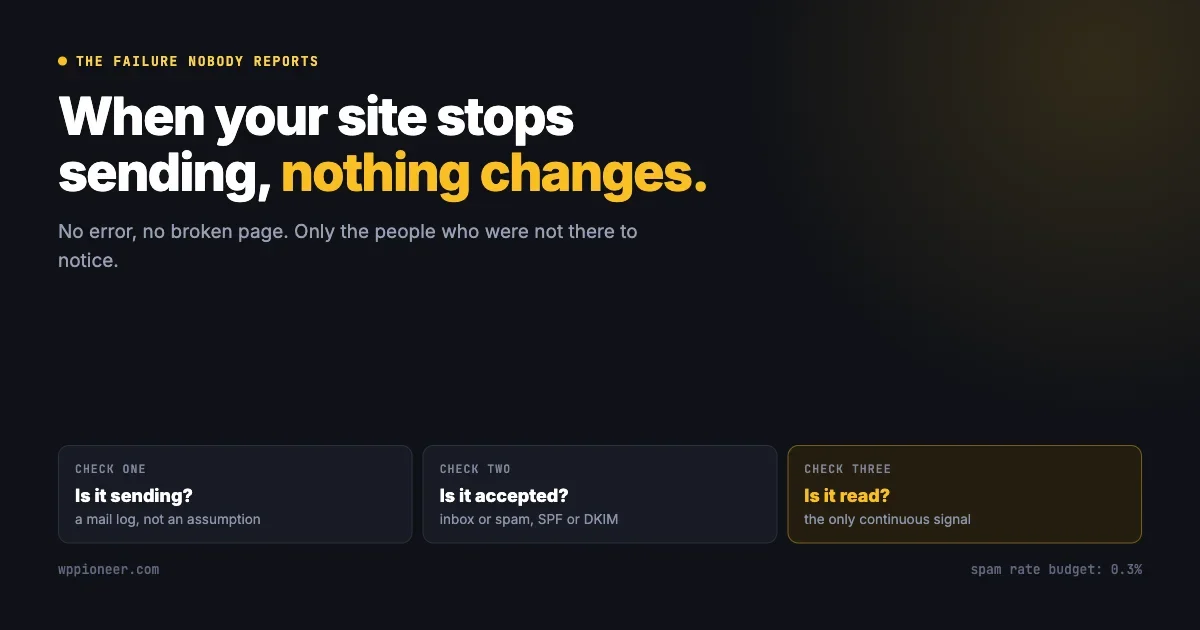
Most website problems announce themselves. A broken page returns an error, a slow page can be timed, a failed payment produces a complaint within minutes.
Email does none of that. When your site stops sending, nothing on the site changes. No error appears in the dashboard, no visitor sees anything wrong, and the people affected are by definition the people who are not there to notice. They simply do not hear from you, and there is no mechanism by which not hearing from somebody becomes a support ticket.
This is an account of how that failure hides, told partly through one we shipped ourselves, and a practical method for finding out whether your own site is currently affected.
A failure with a working substitute beside it
A recent release of one of our own community plugins fixed a bug worth describing precisely, because the shape of it is common and the shape is what matters.
On any site running a particular background task scheduler, which is extremely common because several major plugins install it, the queued job that sent notification emails about new posts failed. Every time. No member received an email about activity in a space they had joined, on any affected site, for as long as the fault existed.
Nobody reported it. The reason is the interesting part.
The notification that appears inside the site was queued separately, and it worked perfectly. So a member who opened the site saw the notification, clicked it, and read the post. From the perspective of anybody actively using the site, the system was functioning correctly, because for them it was.
The failure only affected people who were not currently on the site. Which is precisely the group email exists to reach. And precisely the group who cannot tell you that they did not receive something.
Redundancy built for reliability is also a mechanism for hiding faults, unless each path reports its own health.
The general lesson generalises well past our plugin. Wherever two channels carry the same message and one of them is silent about its own failures, the working channel does not reveal the broken one. It conceals it.
Why email fails silently by default
Out of the box, WordPress hands email to the web server, which passes it onward. Three consequences follow, and each one produces a different kind of invisible failure.
Success is reported at the wrong moment
The site considers the message sent as soon as the server accepts it for delivery. That happens within milliseconds, long before anything has travelled anywhere.
If the message is dropped two hops later, rejected by the receiving provider, or filed straight into a spam folder, none of that travels back. The site recorded a success and moved on. Any plugin that logs “email sent” is logging the handoff, not the delivery, and the distinction is the whole problem.
The sending address has a reputation you did not choose
On shared hosting, your site sends from an address shared with hundreds or thousands of other sites on the same server. Their behaviour becomes your reputation. If any of them sends bulk mail, or is compromised and sends spam, the address they share with you accumulates the consequences.
Many of those shared addresses are already on blocklists before your site sends its first message. Nothing about your own conduct affects this and nothing in your dashboard reveals it.
Nothing proves the mail is from you
Without authentication, a receiving provider has no way to distinguish a message genuinely from your domain from one forged by somebody else. Historically that meant a spam-folder risk. It now means something firmer, which the next section covers.
What the major providers now require
This changed materially in February 2024 and a large number of site owners have not caught up, because nothing broke loudly when it did.
Google’s published sender requirements now apply to everybody sending to Gmail addresses, not only to marketing senders. The precise wording matters, because the requirement is frequently overstated and then dismissed as too complicated.
Requirement | All senders | Bulk senders (5,000+ per day) |
|---|---|---|
Authentication | SPF or DKIM | SPF and DKIM |
DMARC | Not required | Required |
Domain alignment | Not required | From: domain must align with SPF or DKIM |
Valid forward and reverse DNS | Required | Required |
TLS connection | Required | Required |
Spam rate | Below 0.3% | Below 0.3% |
One-click unsubscribe | Not required | Required on marketing mail |
The distinction in the first row is the one worth holding on to. An ordinary site sending password resets, order confirmations and notification emails needs SPF or DKIM, not both. That is a smaller job than the version of this advice that circulates, and it is the difference between a task somebody completes and a task somebody postpones.
Both, plus DMARC and alignment, become necessary at five thousand messages a day. A community site with an active membership can reach that during a busy week without anyone planning to, so it is worth knowing where the line sits rather than assuming it is far away.
The spam rate threshold deserves a moment too. Below 0.3 percent sounds generous until you consider that a recipient pressing “report spam” rather than unsubscribing counts toward it. Three complaints in a thousand messages is the budget.
That number has a practical implication for community sites in particular. If members are subscribed automatically to notifications they did not ask for, and unsubscribing is harder than pressing the spam button, a proportion will press the spam button. Every one counts against the domain, and the damage applies to password resets and order confirmations too, not only to the notifications that caused it.
Making notification preferences easy to find is therefore a deliverability measure rather than only a courtesy. The cheapest way to protect the mail that matters is to make it effortless to switch off the mail that does not.
Which emails matter most
Not every message a site sends carries the same weight, and it is worth knowing which failures are expensive before deciding how much effort this deserves.
Message | What failure costs | Will anyone report it? |
|---|---|---|
Password reset | The person cannot get in at all | Yes, quickly |
Order or payment confirmation | Customer believes the purchase failed, may pay twice or request a refund | Usually |
Account or email verification | Registration never completes; the person is counted as an abandoned signup | Rarely |
Community or course notifications | Members stop returning; recorded as declining engagement | Almost never |
Digest and reminder mail | Slow erosion of the habit the site depends on | Never |
Community notifications sit in the middle of that table and matter more than their position suggests, for reasons covered in what breaks when a community starts working. Read that last column downward. The messages people complain about are the ones you would find anyway. The messages nobody complains about are the ones that quietly determine whether the site keeps its audience.
Verification effort should follow the bottom of that table rather than the top, which is the opposite of where attention naturally goes.
The verification row also explains a pattern worth recognising. A site whose password resets work is often assumed to have working email, because that is the one message somebody tested. It proves that one path functions and says nothing about the others, which frequently travel through entirely different code.
Finding out where you stand
Three questions, in order. Each one is answerable in a few minutes and each has a different fix.
Question one: is the site attempting to send at all?
Start here, because a message never attempted cannot be a delivery problem, and this is the failure our own bug was.
Install a mail logging plugin. Several exist, several are free, and the good ones record every message the site tries to send along with whether the handoff succeeded. Then trigger the emails you actually care about and watch the log:
- Request a password reset for a test account.
- Place a test order, if the site sells anything.
- Register a new test account and complete whatever the welcome sequence is.
- Trigger whatever your community, membership or course plugin is supposed to send: a new post notification, an enrolment confirmation, a comment reply.
The last one is where faults hide, because plugin notifications are the least tested category of email on most sites and frequently the highest volume.
If a message you expected does not appear in the log at all, the problem is not deliverability. Something upstream is failing, and no amount of authentication work will help.
Question two: is it being accepted?
Send a test message to an address at each of the major providers. Not one address, several, because they behave differently and a message can be accepted by one and filed as spam by another.
Check three things when it arrives, all of which are visible without technical tooling:
- Did it arrive in the inbox or the spam folder? Spam placement is a failure, not a partial success. Most people never look in that folder.
- Does the message show a warning? Some providers display a banner about being unable to verify the sender, which tells you authentication is missing before you check anything else.
- Open the message details or original. Most webmail clients will show whether SPF and DKIM passed. This is the fastest authoritative answer to whether authentication is working.
There are also free services that give you an address to send to and return a full report on authentication, formatting and blocklist status. For most site owners that is the single most efficient version of this check.
Question three: is it being read?
This one is ongoing rather than a one-off check, and it is the one that catches a fault that develops later.
Google provides a free tool for domain owners that reports how your mail is being treated: spam rate, authentication results, delivery errors and reputation over time. It requires a DNS record to verify the domain and then reports continuously.
It is the only view most site owners will ever get of what happens after the message leaves. Given that everything else in this article is a snapshot, having one continuous signal is disproportionately valuable.
The fix, in the order worth doing it
Stop sending through the web server
This is the single change that resolves most of what is described above, and it takes about fifteen minutes.
Route the site’s mail through a service built for sending mail rather than through the machine that serves your pages. Free tiers on the major transactional providers cover a small site comfortably, and the plugins that connect WordPress to them are well maintained and widely used.
Doing this fixes the shared-reputation problem, provides authentication as part of the setup, and gives you delivery reporting that the web server never had. It also means failures become visible, which is the entire objective.
One choice worth making deliberately: use a transactional service rather than connecting the site to a personal mailbox account. Personal accounts have sending limits that are low enough to matter, and a notification sweep to a few hundred members will hit that ceiling partway through, delivering to some people and not others. That failure is worse than a total one, because it looks like success.
Authenticate the domain
Your transactional provider will give you the DNS records to add and will verify them for you once they are in place. For an ordinary site that means SPF or DKIM, as covered above.
Add DMARC once those are working, even though it is not required below the bulk threshold. Starting it in its reporting-only mode changes nothing about delivery and begins sending you reports about who is sending mail claiming to be your domain, which is information worth having before you need it.
Send from a domain you control
A surprising number of WordPress sites send with a from-address at a free mail provider, because that address was convenient during setup.
Providers treat this poorly and increasingly reject it outright, because a message claiming to come from a large free provider while being sent from somewhere else is indistinguishable from forgery. Send from your own domain, and make sure it is a real address that can receive replies, because a proportion of recipients will reply to a notification regardless of what it says.
Four situations that break email without warning
Since the failure is silent, it helps to know which events tend to cause it. Each of these has broken mail on real sites, and none of them looks like an email change at the time.
Moving to a new host
The most common cause by a wide margin. The site moves, the DNS follows, and the authentication records that pointed at the old arrangement either do not come across or now describe a server that no longer sends your mail.
Everything on the site looks correct, because everything on the site is correct. Only the mail is affected, and only from the receiving end, which nobody is checking on migration day.
Adding a security or performance plugin
Some security plugins restrict outbound connections, which can prevent the site reaching an external mail service. Some caching layers interfere with the scheduled tasks that queued mail depends on.
In both cases the plugin is doing roughly what it was installed to do, and email is collateral. The connection is rarely made, because the two events are separated by however long it takes somebody to notice.
Anything that changes how scheduled tasks run
A great deal of WordPress email is not sent at the moment the event happens. It is queued and sent by a background process shortly afterwards, which is the correct design, since nobody wants a page load to wait on an email.
It also means anything affecting that background process affects mail. This is the category our own failure fell into, and the reason it is worth calling out separately: the fault was not in the email code at all. The email code was never reached.
Growing past a threshold you did not know about
Sending limits are usually expressed per hour or per day, and they are enforced by cutting delivery off rather than by warning you in advance.
A membership that grows steadily will one day send a notification sweep that crosses a limit partway through. Some members receive it, some do not, and the site records the whole run as successful. Partial delivery is the hardest version of this problem to detect, because every check you run afterwards on your own address will pass.
Noticing the next failure faster
The same reasoning applies to any record your site keeps about members, which is worth auditing alongside this one: see what your site quietly keeps. Everything above establishes that email works today. The harder problem is noticing when it stops, since the failure mode is silence and silence is what a healthy quiet period looks like too.
Three habits cover it without much effort.
Keep the mail log running. Not just for the initial audit. A log with a gap in it is the clearest evidence you will get, and gaps are obvious in a way that absence never is.
Put a real address on the receiving end. Subscribe one monitored mailbox to whatever your members receive: the new post notification, the weekly digest, the order confirmation. If your members stop hearing from the site, so do you, and you will notice within a day rather than a quarter.
Re-check after every significant change. A host migration, a new caching layer, a security plugin, a major update to anything that sends. Our own failure arrived through a background task scheduler that a plugin update installed, which is not a category most people would think to re-test.
That last point is the practical version of the whole article. Email is the part of a WordPress site most likely to break as a side effect of something unrelated, and least likely to tell you.
Two things not worth doing
Both appear in most advice on this subject and neither earns its place.
Adding open tracking to check whether mail arrives. A tracking pixel reports opens, and most mail clients now block images by default or load them through a proxy that fires regardless of whether a human looked. So an open rate is neither a delivery measurement nor a reading measurement. It is a measurement of image loading, and it collects data about your recipients as a side effect. Use the delivery reports from your sending service, which describe what actually happened.
Sending a test to yourself and concluding everything works. If your own address is at the same provider as your site, or you have previously marked mail from your domain as safe, you are close to the least representative recipient available. The message that reaches you says very little about the one going to a member on a different provider who has never interacted with your mail before.
Test to addresses at providers you do not control, and treat the result from a fresh address as the honest one.
What to do this week
If you do nothing else, do these three, in this order:
- Send yourself a password reset from your own site, to an address at a major provider, and look at where it lands and whether authentication passed. Five minutes, and it tells you immediately whether you have a problem.
- Install a mail log and trigger every email your site is supposed to send. Half an hour. This is the step that catches the failure nobody reports, because it is the only way to see a message that was never attempted.
- Route mail through a transactional service and authenticate the domain. Fifteen minutes, and it resolves most of what the first two steps will have found.
The reason to do this now rather than when somebody complains is that nobody is going to complain. A member who stopped receiving notifications does not write in to say so. They visit less, then stop visiting, and the site records that as a decline in engagement rather than as a fault.
That is what makes this worth an afternoon. Not because email is likely to be broken, but because if it is, nothing else on your site will tell you.

No comments yet